Coming up: Christmas
 Find my look in 3 taps















































 Girls
Night Flash Close Up AI Photo Prompt for Girls
Copy this AI photo prompt for girls below and paste it into ChatGPT or Gemini with your own photo.
Your prompt
Edit the uploaded photo. Use the person in it as the identity reference. Keep their face shape, eyes, nose, lips, skin tone, age and hair exactly as they are. No face reshaping, no plastic-smooth skin.

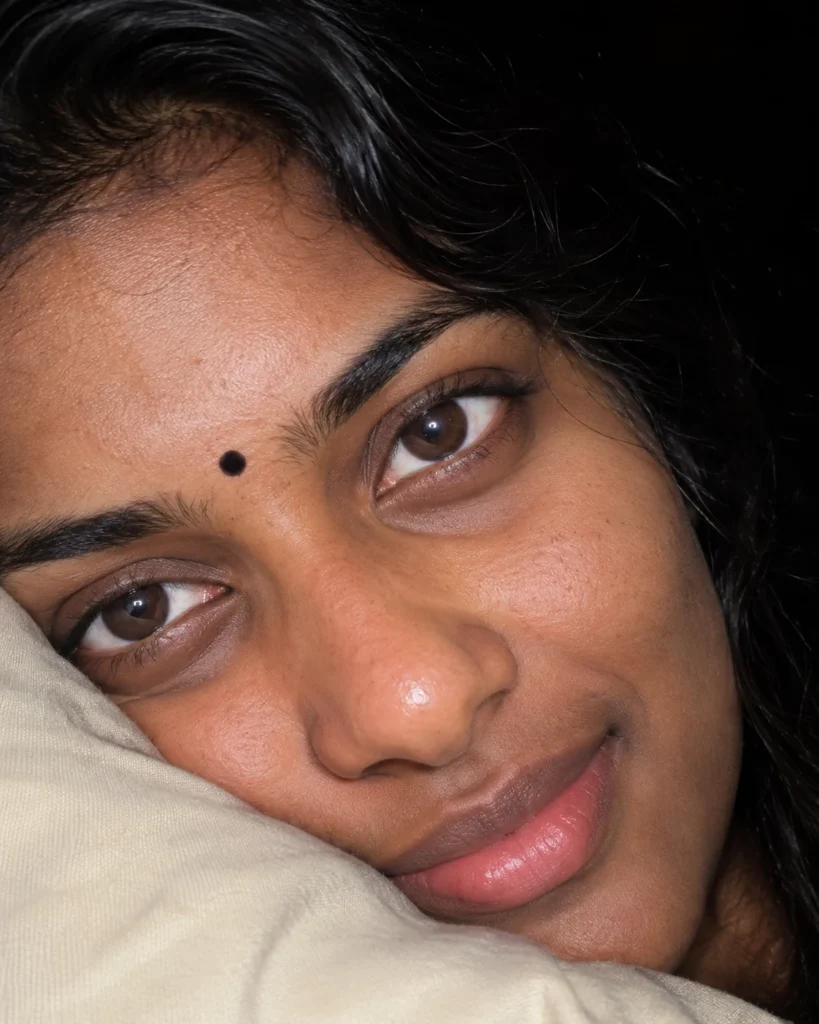
An extreme close-up of the person lying with one cheek resting on a light cream pillow in a dark room at night, the camera tilted sideways. Only her eyes, eyebrows, nose, cheeks and lips are in the frame, part of the face going out of frame. Soft, dreamy, slightly emotional look straight into the lens.

Styling: no visible clothing, only the face, small gold nose stud kept if present.

Direct phone flash at night: bright face, dark falloff, visible skin pores and fine texture, a little grain. Real photo look, natural skin texture, true-to-life colours, crisp detail. 4:5 frame. No watermark.
Collections and similar looks
Share
Help for this look
How to make it, tips, answers and quick fixes. Tap a row to open it.
What this prompt creates
An extreme close-up taken at night with direct phone flash. Her cheek rests on a light cream pillow in a dark room, and the camera is tilted sideways. Only her eyes, eyebrows, nose, cheeks and lips fit in the frame, part of the face falling outside it. She looks straight into the lens with a soft, dreamy, slightly emotional expression, real pores and fine skin texture visible.
Make it yours
- Make it black and white.
- Add a hand resting near the face.
- Change the pillow to a soft pink one.
Want to know more? Read about flash photography on Wikipedia.
How to make this night flash close up photo
- Pick a clear photo
Face towards the camera in good light. Any outfit is fine; the prompt changes it.
- Copy the prompt
Change the pillow colour or add a hand near the face.
- Paste with your photo
Open ChatGPT or Gemini, upload your photo, paste and send.
- Fine-tune it
Reply “softer flash” if it looks too bright.
Tips for this look
- A sharp, front-facing photo keeps the eyes true.
- Try black-and-white for a moody version.
- Use 4:5 or 1:1.
- A sharp front-facing photo keeps your eyes true.
- Avoid heavy makeup in the upload; texture matters here.
- Choose a photo with your eyes open and relaxed.
Quick answers
Will it change my skin?
No. The prompt keeps real texture and pores.
Is it too close?
Say “a little wider, show my hair” to step back.
Common problems and quick fixes
😕 My face doesn’t look like me
Use a sharper, front-facing photo in daylight, then reply “keep my face exactly as in my photo, only change the scene”.
🌙 My face looks too dark
Reply “add soft warm light on my face, keep the background the same”.
👗 The outfit colour isn’t right
Use the outfit quick change, or reply “make the outfit exactly [colour]”.
🎨 Skin looks too smooth
Reply “keep my natural skin texture, no beauty filter”. Small follow-ups work better than starting over.
More looks for girls
Similar looks, picked by style and occasion.