Coming up: Christmas
 Find my look in 3 taps















































 Girls
Golden Window 3 Layer AI Photo Prompt for Girls
Copy this AI photo prompt for girls below and paste it into ChatGPT or Gemini with your own photo.
Your prompt
Edit the uploaded photo. Use the person in it as the identity reference. Keep their face shape, eyes, nose, lips, skin tone, age and hair exactly as they are. No face reshaping, no plastic-smooth skin.

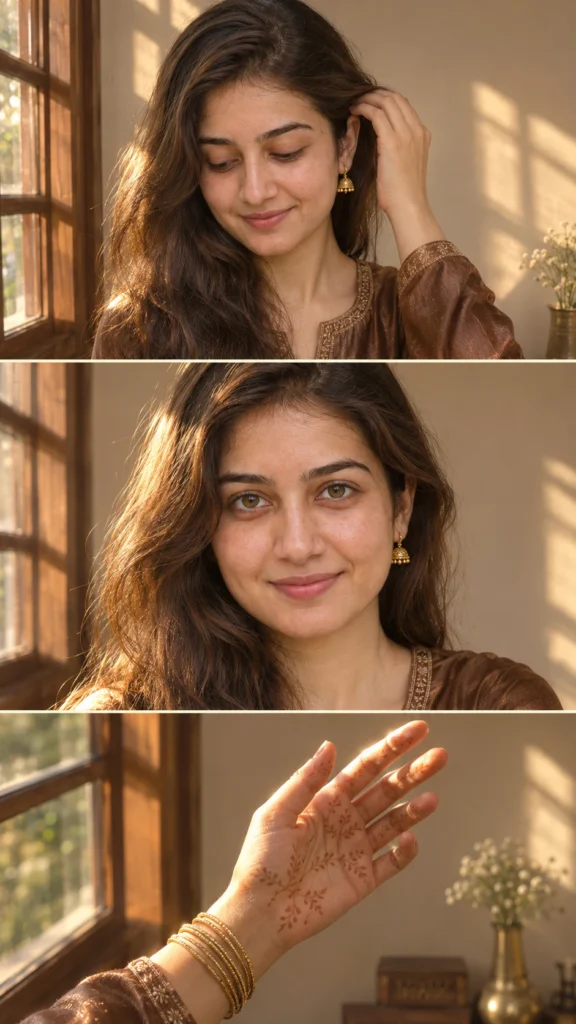
One tall image split into three wide horizontal frames stacked on top of each other, separated by thin clean gaps, all three frames from the same moment and the same light, the same person in every frame. Top frame: the person tucks her hair behind one ear, eyes lowered, a jhumka catching the light. Middle frame: a close-up of her face turned to the camera with a soft, shy smile. Bottom frame: a close-up of her hand held up in the sunbeam, the bangles and mehendi glowing. All in a quiet room in late afternoon, warm sunlight falling through a wooden window and painting soft stripes of shadow on a beige wall.

Styling: a soft brown silk kurta, small gold jhumkas and a stack of thin gold bangles, light mehendi on the hands.

Honey-gold light, warm browns and creams, gentle shadow stripes, calm and dreamy. Real photo look, natural skin texture, true-to-life colours, crisp detail. 9:16 frame. No watermark.
Collections and similar looks
Share
Help for this look
How to make it, tips, answers and quick fixes. Tap a row to open it.
What this prompt creates
One tall picture split into three frames, all lit by warm afternoon sun coming through a wooden window. In the top frame you tuck your hair behind your ear with your eyes lowered and a gold jhumka catching the light. The middle frame is a close-up of your shy smile. The bottom frame shows your hand raised into the sunbeam, mehendi and thin gold bangles glowing against a soft brown silk kurta.
Make it yours
- Swap the brown kurta for a cream or maroon saree.
- Replace the bangles frame with a close-up of your earrings or nose pin.
- Ask for the whole set in black and white.
Want to know more? Read about the triptych, a picture made of three panels on Wikipedia.
How to make this golden window 3 layer photo
- Pick a clear photo
Face towards the camera in good light. Any outfit is fine; the prompt changes it.
- Copy the prompt
Change the brown kurta to a cream or maroon saree.
- Paste with your photo
Open ChatGPT or Gemini, upload your photo, paste and send.
- Fine-tune it
Reply “keep the same face in all three frames” if one frame looks different.
Tips for this look
- A clear front photo of your face works best.
- Ask for “black and white” for a classic version.
- Keep the tall 9:16 shape so all three frames fit.
- Upload a clear front photo with your face fully visible.
- Natural daylight in your photo helps the skin tone stay true.
- Keep the tall 9:16 shape so no frame gets squeezed.
Quick answers
Do I need three photos?
No. One clear photo is enough; the AI makes all three frames from it.
Can I change what each frame shows?
Yes. Edit the Top, Middle and Bottom frame lines in the prompt.
Common problems and quick fixes
😕 My face doesn’t look like me
Use a sharper, front-facing photo in daylight, then reply “keep my face exactly as in my photo, only change the scene”.
🖼️ My face changes between frames
Reply “keep my face identical in every frame”. Uploading 2–3 photos of yourself also helps.
✋ Hands or fingers look odd
Reply “fix the hands and fingers, keep everything else the same”.
🟠 Everything looks too yellow or orange
Reply “keep the colours natural and my skin tone true, less orange cast”.
More looks for girls
Similar looks, picked by style and occasion.