Coming up: Christmas
 Find my look in 3 taps














































 🪔 Festive
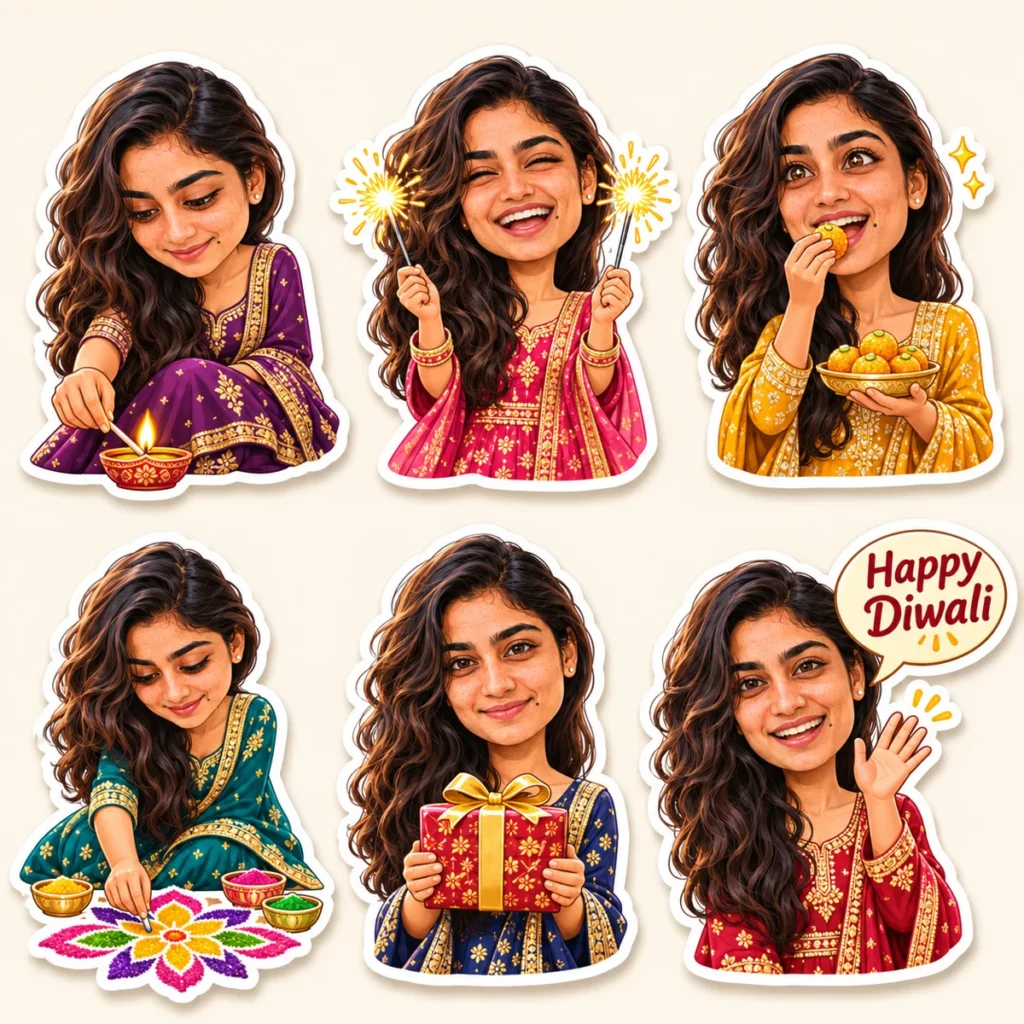
Diwali Chibi Sticker Pack AI Prompt from Your Photo
Copy this AI photo prompt for girls below and paste it into ChatGPT or Gemini with your own photo.
Your prompt
Use the person in the uploaded photo. Create a sticker sheet of 6 cute chibi-style die-cut stickers of them (big head, small body, their face, hair and skin tone clearly recognisable) wearing festive Diwali outfits, each with a thick white sticker border and soft shadow, on a light cream background.

The six stickers: 1) lighting a diya, 2) holding two sparklers and laughing, 3) eating a laddoo with sparkly eyes, 4) drawing a rangoli, 5) holding a gift box, 6) waving with a “Happy Diwali” speech bubble.

Finish: colourful, glossy, premium sticker-pack look. 1:1 frame. No watermark.
Collections and similar looks
Share
Help for this look
How to make it, tips, answers and quick fixes. Tap a row to open it.
What this prompt creates
A sticker sheet on a light cream background holds six cute chibi versions of you, each with a big head, a small body and your own face, hair and skin tone, cut out with a thick white border and a soft shadow. Dressed in festive outfits, the six show you lighting a diya, laughing with two sparklers, eating a laddoo with sparkly eyes, drawing a rangoli, holding a gift box, and waving with a “Happy Diwali” speech bubble.
Make it yours
- Change the bubble on sticker six to “Shubh Deepavali” or your name.
- Replace the gift-box sticker with you holding a box of sweets.
- Dress all six in one colour pair, like yellow and pink.
Want to know more? Read about the chibi art style on Wikipedia.
How to make this Diwali sticker pack
- Pick a clear photo
Face towards the camera in good light. Any outfit is fine; the prompt changes it.
- Copy the prompt
Tap Copy prompt. Change the stickers or outfits in the prompt if you like.
- Paste with your photo
Open ChatGPT or Gemini, upload your photo, paste and send.
- Fine-tune it
Reply “make sticker 3 bigger” or “change sticker 6 text to Shubh Deepavali”.
Tips for this look
- Crop each sticker to send it on WhatsApp.
- Works great for kids and couples too.
- Keep the white border for the die-cut look.
- Use a front-facing photo with your hairstyle clearly visible; chibi faces depend on hair.
- If you wear glasses every day, upload a photo with them on.
- Fix one sticker at a time if a face looks off, by naming its number in your reply.
Quick answers
How do I use them on WhatsApp?
Save the image, crop each sticker, then add them with any sticker-maker app.
Can I change the six actions?
Yes. Edit the numbered list in the prompt to any Diwali moments you like.
Common problems and quick fixes
😕 My face doesn’t look like me
Use a sharper, front-facing photo in daylight, then reply “keep my face exactly as in my photo, only change the scene”.
🧸 The cartoon doesn’t look like me
Reply “keep my hairstyle, face shape and skin tone in the cartoon”. A smiling, front-facing photo helps most.
🟠 Everything looks too yellow or orange
Reply “keep the colours natural and my skin tone true, less orange cast”.
👗 The outfit colour isn’t right
Use the outfit quick change, or reply “make the outfit exactly [colour]”.
More looks for girls
Similar looks, picked by style and occasion.