


 Coming up: Christmas
 Find my look in 3 taps















































 💑 Couple
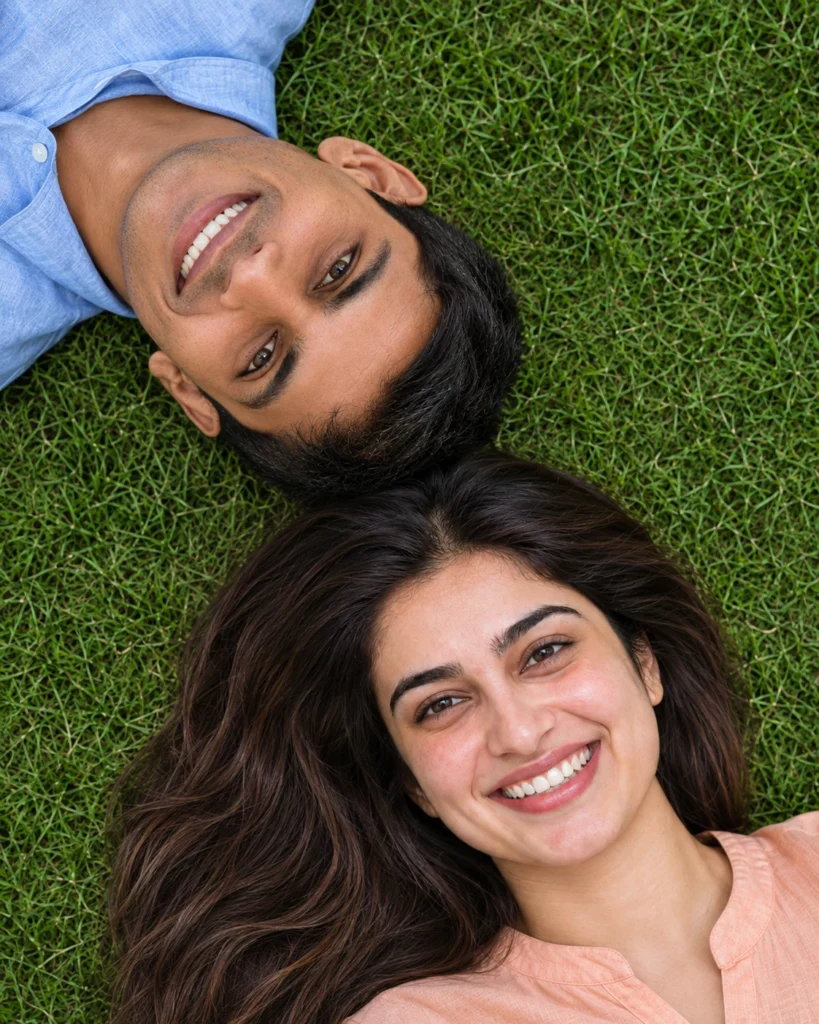
Head-to-Head on Grass Couple AI Photo Prompt
Copy this couple AI photo prompt below and paste it into ChatGPT or Gemini with a photo of you both.
Your prompt
Edit the uploaded photo of two people. Use each person as their own identity reference and keep both faces exactly as they are: face shape, eyes, nose, lips, skin tone, age and hair. Keep the two people clearly separate; do not blend their features.

On a close-cut green lawn in open shade, the couple lies on their backs with the crowns of their heads almost touching and their bodies pointing towards opposite corners. Shoot straight down, crop at the shoulders and let the longer hair fan naturally over the green blades as both look up.

Styling: a pale blue linen shirt for him and a soft peach cotton blouse for her.

Even open-shade daylight, cool greens and a quiet weekend mood. Keep natural skin texture and fine detail in both faces. 4:5 frame. No watermark.
Collections and similar looks
Share
Help for this look
How to make it, tips, answers and quick fixes. Tap a row to open it.
What this prompt creates
Green grass fills the picture around you both as you lie back with the tops of your heads nearly touching. Your shoulders point towards opposite corners, with pale blue linen on one side and peach cotton on the other. The camera looks straight down as you look up, and the longer hair spreads loosely among the blades. Open shade leaves the light soft across both faces.
Make it yours
- Change the peach top to lilac.
- Try a lawn with slightly darker grass.
- Ask for the crop to show a little more grass on all sides.
Want to know more? Read about a bird's-eye view on Wikipedia.
How to make this head-to-head on grass couple photo
- Pick a clear photo of you both
Face towards the camera in good light. Any outfit is fine; the prompt changes it.
- Copy the prompt
Try a white shirt and a lilac blouse.
- Paste with your photo
For ChatGPT & Gemini, open either app and upload your photo. Paste the prompt and send it.
- Fine-tune it
Ask for the camera to sit directly above both faces.
Tips for this look
- Pick photos with both faces looking straight at the camera.
- Use a photo that shows your hair length.
- Choose similar lighting in both uploads.
- Pick front-facing photos with both eyes visible.
- Use a photo that shows the length of any loose hair.
- Choose even light on both faces if you are uploading separately.
Quick answers
Do we need a photo taken on grass?
Clear photos of your faces are enough to give the prompt its references.
Which way do we face?
Look up at the camera with your heads close and your shoulders pointing apart.
Common problems and quick fixes
👥 Our faces got mixed
Keep the first lines of the prompt: they tell the tool to keep you two separate. Two separate clear photos also help.
👗 The outfit colour isn’t right
Use the outfit quick change, or reply “make the outfit exactly [colour]”.
🎨 Skin looks too smooth
Reply “keep my natural skin texture, no beauty filter”. Small follow-ups work better than starting over.
🔁 It isn’t quite the look
Regenerate once, or reply with one change at a time, like “wider shot” or “warmer light”.
More couple looks
Similar looks, picked by style and occasion.

