Coming up: Christmas
 Find my look in 3 taps

















































 Girls
80s Hill Road Maruti 800 Family AI Photo Prompt
Copy this family AI photo prompt below and paste it into ChatGPT or Gemini with a photo of your family.
Your prompt
Edit the uploaded family photos. Use each person as their own identity reference and keep every face exactly as it is: face shape, eyes, nose, lips, skin tone, age and hair. Keep the people clearly separate; do not blend their features.

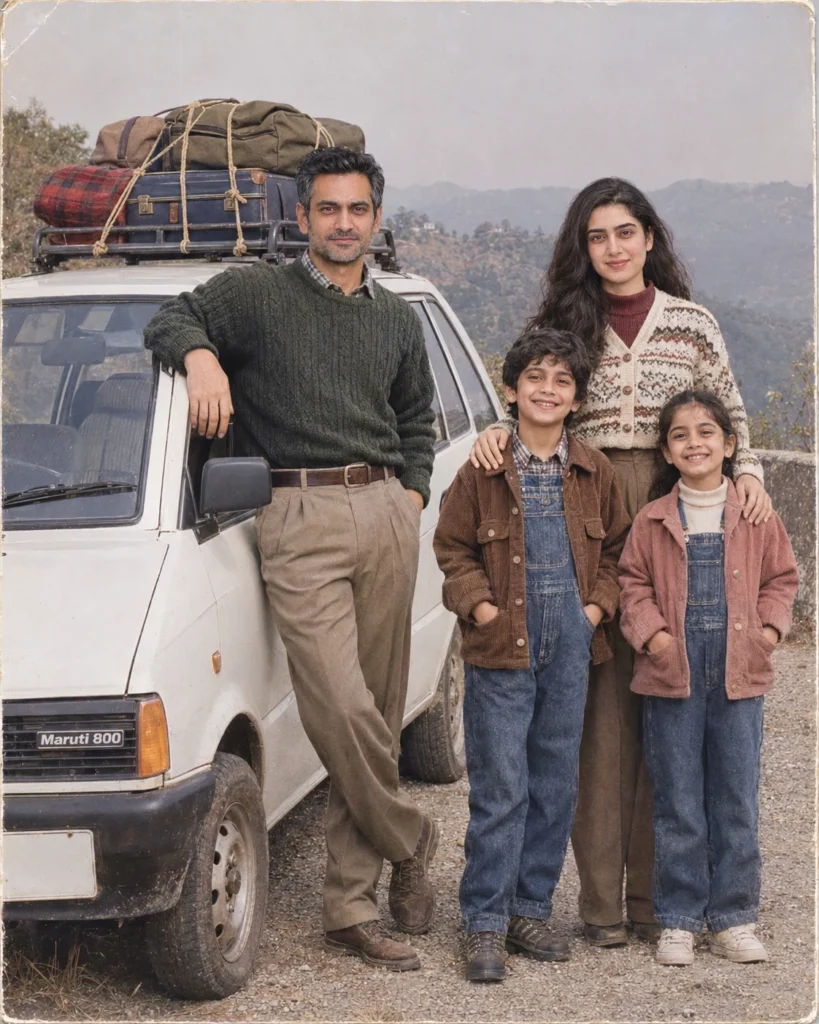
In a hill-road pullout with a white Maruti 800 and strapped luggage on its roof carrier, the family of four lines up beside the car, one parent resting a hand on the door while the children stand up front with the other adult right behind them.

Styling: knit layers and high-waisted trousers for the two adults, full-length dungarees and buttoned jackets for the two children.

Muted hills and late morning light, slightly faded colours like an old album print. Real photo look, natural skin texture, true-to-life colours, crisp detail. 4:5 frame. No watermark, flags or religious elements.
Collections and similar looks
Share
Help for this look
How to make it, tips, answers and quick fixes. Tap a row to open it.
What this prompt creates
The family has pulled off a hill road for a quick picture beside a little white hatchback. Luggage is tied across the roof carrier, and one adult rests a hand on the door while the other stands behind the children. Knit layers, high-waisted trousers and buttoned jackets pick up the soft late morning light as the hills fade behind you.
Make it yours
- Use matching suitcases.
- Show more of the road.
- Give the children different jacket colours.
Want to know more? Read about road trips on Wikipedia.
How to make this 80s hill road maruti 800 family photo
- Pick a clear photos of your family
Face towards the camera in good light. Any outfit is fine; the prompt changes it.
- Copy the prompt
Change the suitcase colours.
- Paste with your photo
To use this prompt with ChatGPT & Gemini, upload your photo in the app you choose, then paste the prompt and send.
- Fine-tune it
Keep the entire roof carrier in frame.
Tips for this look
- Use a clear reference for every family member.
- Separate clear photos work if you lack a group picture.
- Use 4:5 to keep the intended composition.
- Upload one face per person.
- Pick photos with a little shoulder room.
- Choose clear pictures of the children.
Quick answers
Do we all need to be in one photo?
You can send individual portraits instead.
Can the shot show more road?
Ask for a wider view around the parked car.
Common problems and quick fixes
😕 My face doesn’t look like me
Use a sharper, front-facing photo in daylight, then reply “keep my face exactly as in my photo, only change the scene”.
✋ Hands or fingers look odd
Reply “fix the hands and fingers, keep everything else the same”.
👥 People in the background look strange
Reply “blur the people in the background more” so the focus stays on you.
👗 The outfit colour isn’t right
Use the outfit quick change, or reply “make the outfit exactly [colour]”.
More family looks
Similar looks, picked by style and occasion.