Coming up: Christmas
 Find my look in 3 taps


















































 🪔 Festive
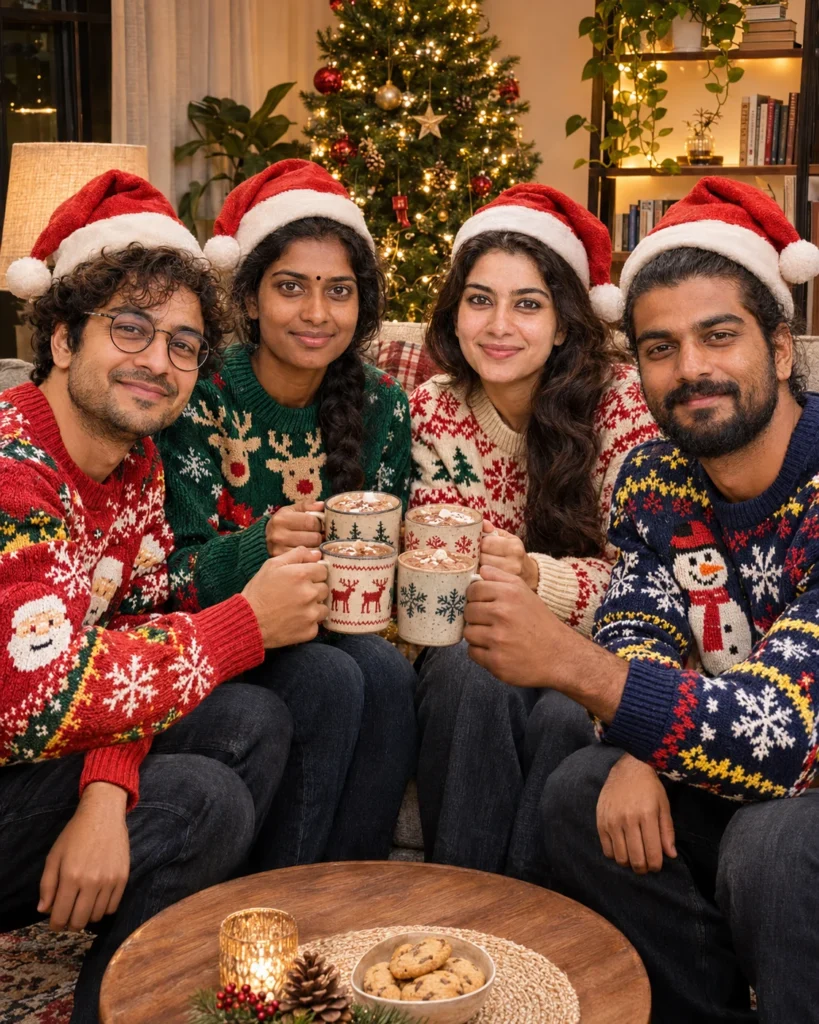
Christmas Ugly Sweater Cocoa Friends AI Photo Prompt
Copy this AI photo prompt below and paste it into ChatGPT or Gemini with your own photo.
Your prompt
Edit the uploaded photos of four friends. Use each person's photo as their own face reference. Keep each face distinct, with the same features, age, skin tone and hair.

In a living room with a lit Christmas tree and a low table set with cocoa mugs, four friends lean in from both sides of the table for a mid-toast cocoa mug clink, with their hat tops and all four faces clear.

Styling: four different loud knitted Christmas sweaters, Santa hats and dark jeans.

Warm tree lights at the back and soft amber light across all four faces. Real photo look, natural skin texture, true-to-life colours, crisp detail. 4:5 frame. No watermark, flags or religious elements.
Collections and similar looks
Share
Help for this look
How to make it, tips, answers and quick fixes. Tap a row to open it.
What this prompt creates
Four friends bend towards the low table to clink cocoa mugs beside a brightly lit tree. Each sweater has a loud knit design of its own, while the Santa hats bring the group together. The camera catches your faces above the mugs, with warm light across your cheeks and little points of light shining through the tree in the background.
Make it yours
- Add marshmallows to the mugs.
- Give each sweater a different pattern.
- Try green hats for the whole group.
Want to know more? Read about Christmas jumpers on Wikipedia.
How to make this christmas ugly sweater cocoa friends photo
- Pick a clear photo of each of the four friends
Face towards the camera in good light. Any outfit is fine; the prompt changes it.
- Copy the prompt
Give each sweater its own pattern.
- Paste with your photo
To use this prompt with ChatGPT & Gemini, upload your photo in the app you choose, then paste the prompt and send.
- Fine-tune it
Keep the mugs below chin height.
Tips for this look
- Use a group shot where none of the four faces overlap.
- Separate clear photos work if you lack a group picture.
- Use 4:5 to keep the intended composition.
- Choose a group photo with clear gaps between faces.
- Pick bright smiles.
- Avoid photos where hats hide the eyes.
Quick answers
Can we match hat colours?
Yes, matching hats tie together the different sweaters.
Can the mugs have marshmallows?
Yes, add them to the cocoa.
Common problems and quick fixes
😕 My face doesn’t look like me
Use a sharper, front-facing photo in daylight, then reply “keep my face exactly as in my photo, only change the scene”.
👥 People in the background look strange
Reply “blur the people in the background more” so the focus stays on you.
👗 The outfit colour isn’t right
Use the outfit quick change, or reply “make the outfit exactly [colour]”.
🎨 Skin looks too smooth
Reply “keep my natural skin texture, no beauty filter”. Small follow-ups work better than starting over.
You might also like
Similar looks, picked by style and occasion.