Coming up: Christmas
 Find my look in 3 taps















































 Girls
Jodhpur Blue City Travel AI Photo Prompt for Girls
Copy this AI photo prompt for girls below and paste it into ChatGPT or Gemini with your own photo.
Your prompt
Edit the uploaded photo. Use the person in it as the identity reference. Keep their face shape, eyes, nose, lips, skin tone, age and hair exactly as they are. No face reshaping, no plastic-smooth skin.

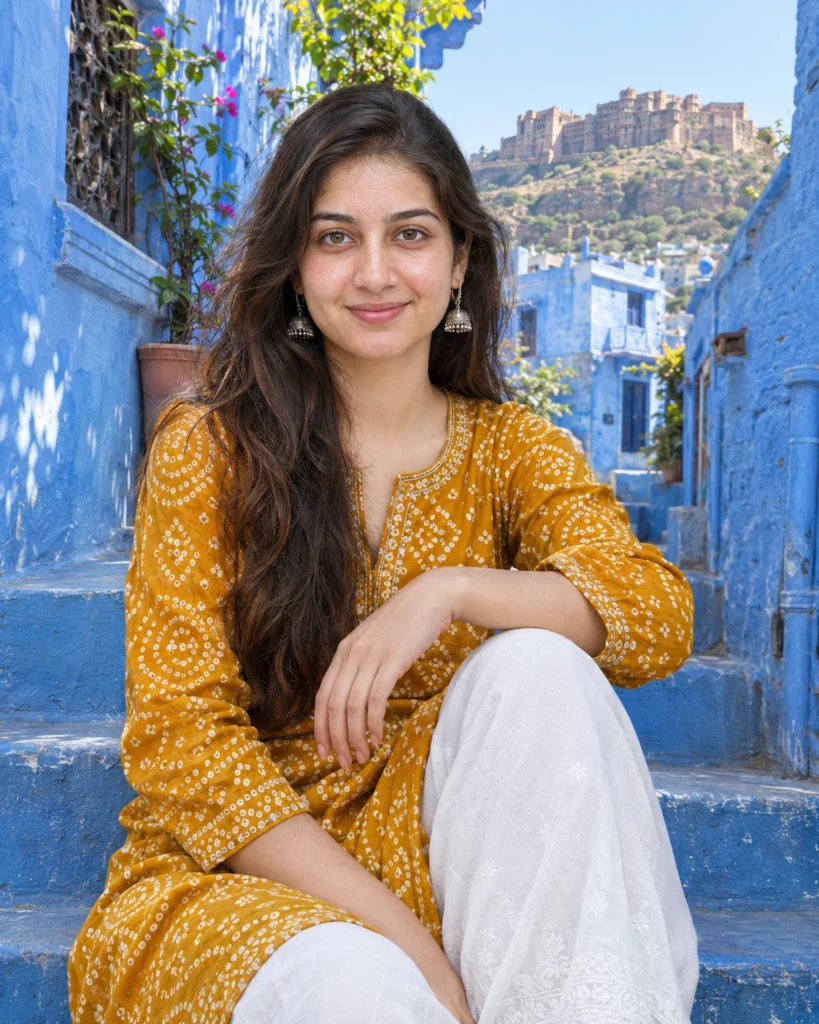
The person sits on blue steps in a narrow blue-painted lane of Jodhpur with a fort on the hill behind, smiling, one hand on her knee.

Styling: a mustard bandhani kurta with white palazzos and silver jhumkas.

Bright morning light, rich blue and mustard. Real photo look, natural skin texture, true-to-life colours, crisp detail. 4:5 frame. No watermark.
Collections and similar looks
Share
Help for this look
How to make it, tips, answers and quick fixes. Tap a row to open it.
What this prompt creates
You sit on blue-painted steps in a narrow lane of Jodhpur, smiling with one hand resting on your knee, while a fort rises on the hill behind you. You wear a mustard bandhani kurta with white palazzos and silver jhumkas. Bright morning light makes the blue walls and your mustard kurta glow side by side, giving the picture a rich, sunny travel feel.
Make it yours
- Change the mustard kurta to a red or pink bandhani one.
- Swap the silver jhumkas for oxidised ones with a nose pin.
- Ask for a few pigeons on the steps beside you.
Want to know more? Read about Jodhpur, the Blue City on Wikipedia.
How to make this Jodhpur blue city travel photo
- Pick a clear photo
Face towards the camera in good light. Any outfit is fine; the prompt changes it.
- Copy the prompt
Tap Copy prompt. Change the kurta colour in the prompt if you like.
- Paste with your photo
Open ChatGPT or Gemini, upload your photo, paste and send.
- Fine-tune it
Reply “brighter blue walls”.
Tips for this look
- A smiling photo works best.
- Use 4:5.
- Try a lehenga version.
- You don't need a sitting photo; any clear photo with a happy smile works.
- Daylight photos suit the bright morning light best.
- Pick a photo where your face is well lit and not in heavy shadow.
Quick answers
Is it a real place?
Yes, Jodhpur’s blue lanes, drawn by AI.
Can I stand instead?
Yes. Change “sits” to “walks”.
Common problems and quick fixes
😕 My face doesn’t look like me
Use a sharper, front-facing photo in daylight, then reply “keep my face exactly as in my photo, only change the scene”.
✋ Hands or fingers look odd
Reply “fix the hands and fingers, keep everything else the same”.
👗 The outfit colour isn’t right
Use the outfit quick change, or reply “make the outfit exactly [colour]”.
🎨 Skin looks too smooth
Reply “keep my natural skin texture, no beauty filter”. Small follow-ups work better than starting over.
More looks for girls
Similar looks, picked by style and occasion.