 Saved


 Works in ChatGPT & Gemini

 Open ChatGPT
 Open Gemini

🪔 Festive
 🪔 Festive
Share
Diwali Rangoli Saree Photo Prompt
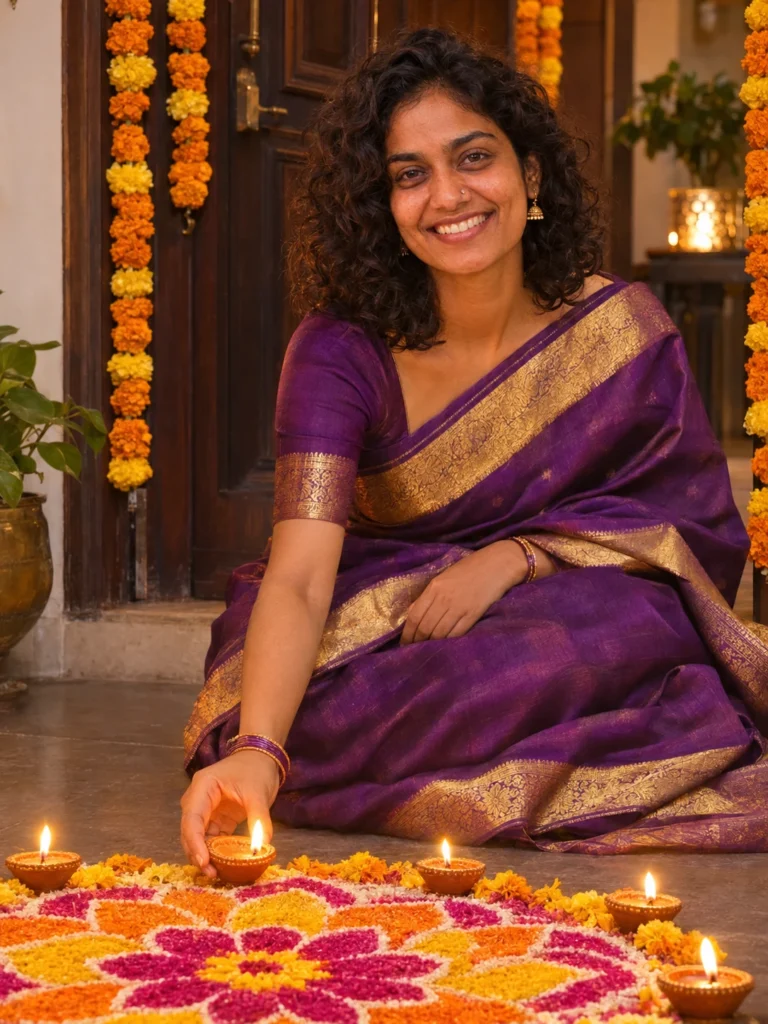
A glowing Diwali portrait in a silk saree, sitting beside a fresh rangoli with diyas all around. Perfect for your festival status and profile picture.
Look #1015 Works in ChatGPT & Gemini
Portrait
Updated 6 Nov 2026
Your prompt
Edit the uploaded photo. Use the person in it as the identity reference. Keep their face, skin tone, age, hairstyle and features exactly as they are. Do not replace them with a different model or add heavy beauty retouching.

Place the same person on the floor of a home entrance on Diwali evening, sitting gracefully beside a large, freshly made rangoli in pink, orange and yellow. Dress them in a royal purple Kanjeevaram silk saree with a gold border, with simple gold earrings and a few glass bangles. They hold a lit diya near the rangoli and look towards the camera with a soft, happy smile. Small diyas line the rangoli, and marigold garlands hang on the door behind.

Use warm, gentle diya light on the face with soft fill so the face stays clear. Use a vertical 3:4 composition, face sharp, natural skin texture and believable hands. No extra people, no text, no watermarks.
Quick changes (optional)
Place
Outfit
Shape
Photo you need: One clear photo of you, face visible and well lit.
About this look
Best forFestival wishes, family posts, status updates
Photo needed1 clear photo of you
Works inChatGPT, Gemini
ShapePortrait 3:4 (changeable)
How to make this Diwali saree photo
- Choose a clear selfie
Face towards the camera, good light, nothing covering the face.
- Copy the prompt
Change the saree colour with the quick changes, or type your own colour in the prompt.
- Paste with your photo
Upload your photo in ChatGPT or Gemini, paste and send.
- Small fixes
Reply “make the rangoli bigger” or “add more diyas”. Keep your face line as it is.
Tips for this look
- Even a casual selfie works. The prompt adds the saree and jewellery.
- If the saree looks too shiny, reply “make the silk look natural, less shine”.
- Want a full-length photo? Change the shape to Story 9:16.
If the face looks different
Use a sharper photo in daylight, then reply “keep my face exactly as in my photo”. Starting a new chat for each try also helps.
Common problems and quick fixes
😕 Face doesn't look like me
Use a sharper, front-facing photo in daylight. Then reply “keep my face exactly as in my photo”.
🎨 Skin looks too smooth
Reply “keep my natural skin texture, no beauty filter”. Small follow-ups work better than starting over.
🌫️ Face looks too dark
Reply “add soft warm light on the face, keep the background the same”.
✋ Hands look odd
Reply “fix the hands, keep everything else the same”.
You might also like
More looks people are making this week.
🪔 Festive
🪔 Festive
🪔 Festive