Coming up: Christmas
 Find my look in 3 taps














































 Boys
Black SUV Bonnet Drone View AI Photo Prompt for Boys
Copy this AI photo prompt for boys below and paste it into ChatGPT or Gemini with your own photo.
Your prompt
Edit the uploaded photo. Use the person in it as the identity reference. Keep their face shape, eyes, nose, lips, skin tone, age and hair exactly as they are. No face reshaping, no plastic-smooth skin.

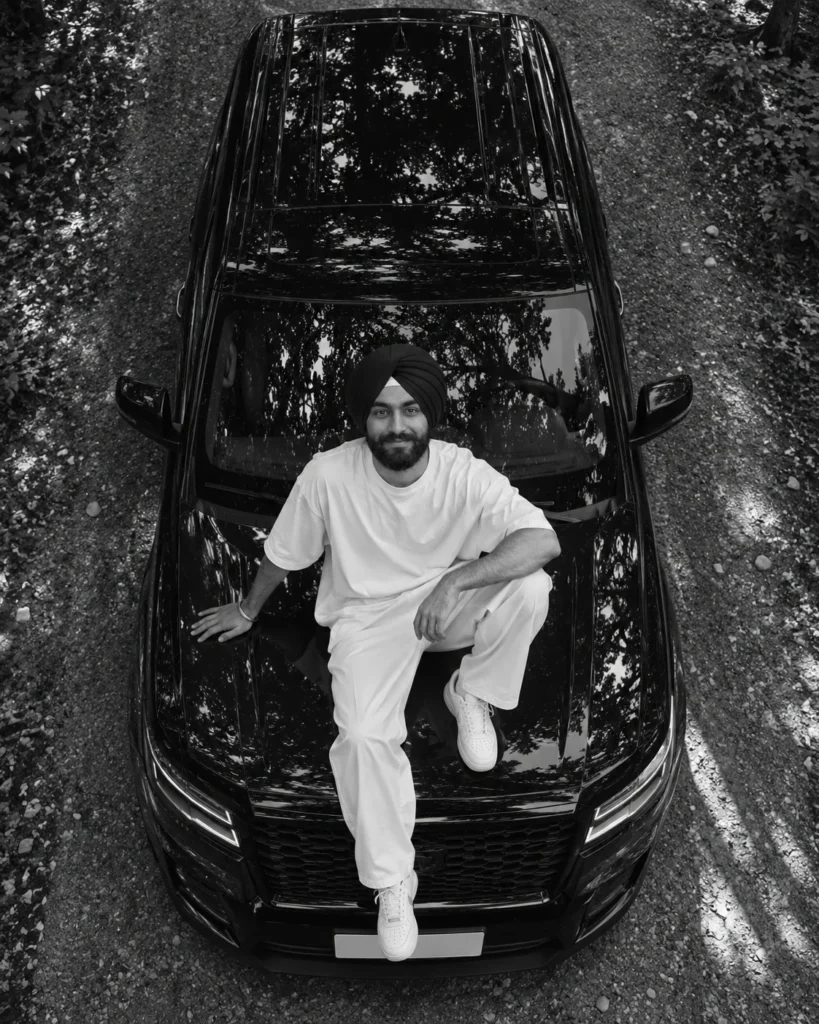
Shot straight down from a drone: the person sits relaxed on the bonnet of a big black SUV on a gravel forest road with tree shadows, one knee up, looking up at the camera. No brand logos; keep the number plate blank.

Styling: an oversized white t-shirt, white trousers and white sneakers.

Black and white, high contrast, editorial. Natural skin texture, true-to-life colours, crisp detail. 4:5 frame. No watermark.
Collections and similar looks
Share
Made with this prompt
More versions of this look
Same prompt, one quick change each. Tap a photo to see it above, or tap Copy prompt to copy that version.
Help for this look
How to make it, tips, answers and quick fixes. Tap a row to open it.
What this prompt creates
Seen from directly above, as if from a drone, you sit relaxed on the bonnet of a big black SUV parked on a gravel road through a forest. Tree shadows fall across the road and the car. One knee is up and you look up into the camera. Your outfit turns all white: an oversized t-shirt, white trousers and white sneakers, shown in high-contrast black and white like a fashion magazine page.
Make it yours
- Switch the all-white outfit to all-black for a darker, moodier version.
- Ask for the photo in colour with green trees and a grey road.
- Replace the gravel road with an empty coastal highway.
Want to know more? Read about aerial photography on Wikipedia.
How to make this SUV drone view photo
- Pick a clear photo
Face towards the camera in good light. Any outfit is fine; the prompt changes it.
- Copy the prompt
Tap Copy prompt. Change the outfit in the prompt.
- Paste with your photo
Open ChatGPT or Gemini, upload your photo, paste and send.
- Fine-tune it
Reply “in colour” for a colour version.
Tips for this look
- White outfits pop in black and white.
- Try a desert road setting.
- Great as a profile picture.
- A sitting photo of you helps, because the AI has to fold your body into the bonnet pose.
- Pick a photo where your face is lifted slightly, close to looking up.
- Good, even light on your face matters more here since you are small in the frame.
Quick answers
Can I choose the car?
Write the car type and colour you want, without a brand.
Do I need a car photo?
No. The prompt adds the car.
Common problems and quick fixes
😕 My face doesn’t look like me
Use a sharper, front-facing photo in daylight, then reply “keep my face exactly as in my photo, only change the scene”.
👗 The outfit colour isn’t right
Use the outfit quick change, or reply “make the outfit exactly [colour]”.
🎨 Skin looks too smooth
Reply “keep my natural skin texture, no beauty filter”. Small follow-ups work better than starting over.
🔁 It isn’t quite the look
Regenerate once, or reply with one change at a time, like “wider shot” or “warmer light”.
More looks for boys
Similar looks, picked by style and occasion.