Coming up: Christmas
 Find my look in 3 taps

















































 Boys
Cinema Lobby Film Poster AI Photo Prompt for Boys
Copy this AI photo prompt for boys below and paste it into ChatGPT or Gemini with your own photo.
Your prompt
Edit the uploaded photo. Use the person in it as the identity reference. Keep their face shape, eyes, nose, lips, skin tone, age and hair exactly as they are. No face reshaping, no plastic-smooth skin.

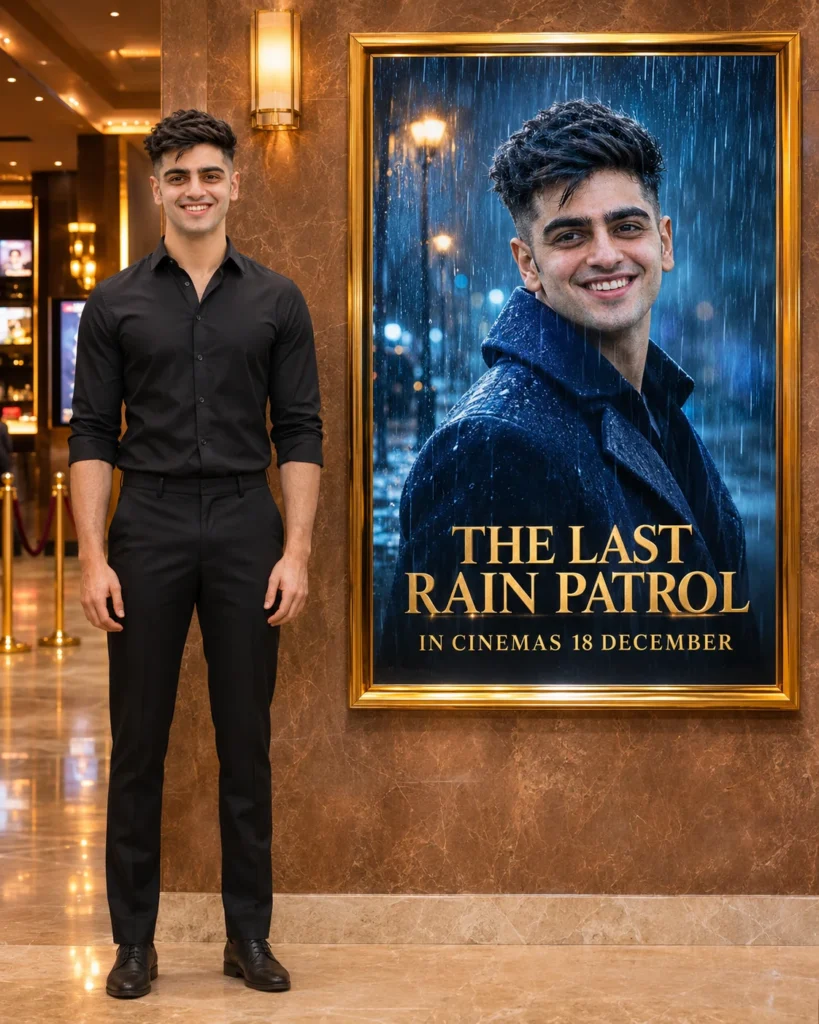
In a cinema lobby with amber wall lights and a giant gold-framed film poster, the person stands beside the poster with his hands loose at his sides while the poster shows his same face as the hero in a midnight-blue coat under rainlit streetlights. Make the frame and the person fully visible side by side, with a large title ‘[FILM TITLE]’ on the poster and ‘IN CINEMAS 18 DECEMBER’ in a smaller line below.

Styling: a crisp black shirt and tailored black trousers for the lobby pose.

Warm lobby light against cool blue poster art, with clean gold lettering. Real photo look, natural skin texture, true-to-life colours, crisp detail. 4:5 frame. No watermark.
Collections and similar looks
Share
Help for this look
How to make it, tips, answers and quick fixes. Tap a row to open it.
What this prompt creates
You stand in a black shirt next to an oversized gold frame in a cinema lobby. Inside the frame, your face appears again as the lead in a made-up film, wearing a midnight-blue coat under rainlit streetlights. Amber wall lights warm the lobby around you. The poster has a large title you can change and a smaller release line just below it.
Make it yours
- Write a short fictional title.
- Edit the release line to suit your post.
- Change the hero?s coat to charcoal.
Want to know more? Read about film posters on Wikipedia.
How to make this cinema lobby film poster photo
- Pick a clear photo
Face towards the camera in good light. Any outfit is fine; the prompt changes it.
- Copy the prompt
Replace [FILM TITLE] with your own made-up title.
- Paste with your photo
To use this prompt with ChatGPT & Gemini, upload your photo in the app you choose, then paste the prompt and send.
- Fine-tune it
Ask for the release line to sit fully inside the frame.
Tips for this look
- Use a well-lit front photo.
- Leave room around your shoulders.
- Keep the title short for larger lettering.
- Use a front-facing photo for both versions of your face.
- Keep a little room around your shoulders.
- Look for even light around your eyes.
Quick answers
Can I change the release date?
Yes. Replace 18 DECEMBER in the release line.
Who is on the poster?
The prompt uses your face both in the lobby and as the fictional lead.
Common problems and quick fixes
😕 My face doesn’t look like me
Use a sharper, front-facing photo in daylight, then reply “keep my face exactly as in my photo, only change the scene”.
🔤 The words are spelt wrong
Reply “fix the spelling, it should read: …” with the exact words. Short names come out cleanest.
✋ Hands or fingers look odd
Reply “fix the hands and fingers, keep everything else the same”.
👗 The outfit colour isn’t right
Use the outfit quick change, or reply “make the outfit exactly [colour]”.
More looks for boys
Similar looks, picked by style and occasion.