Coming up: Christmas
 Find my look in 3 taps















































 💑 Couple
Golden Saree Shoulder Glance Couple AI Photo Prompt
Copy this couple AI photo prompt below and paste it into ChatGPT or Gemini with a photo of you both.
Your prompt
Edit the uploaded photo of two people. Use each person as their own identity reference and keep both faces exactly as they are: face shape, eyes, nose, lips, skin tone, age and hair. Keep the two people clearly separate; do not blend their features.

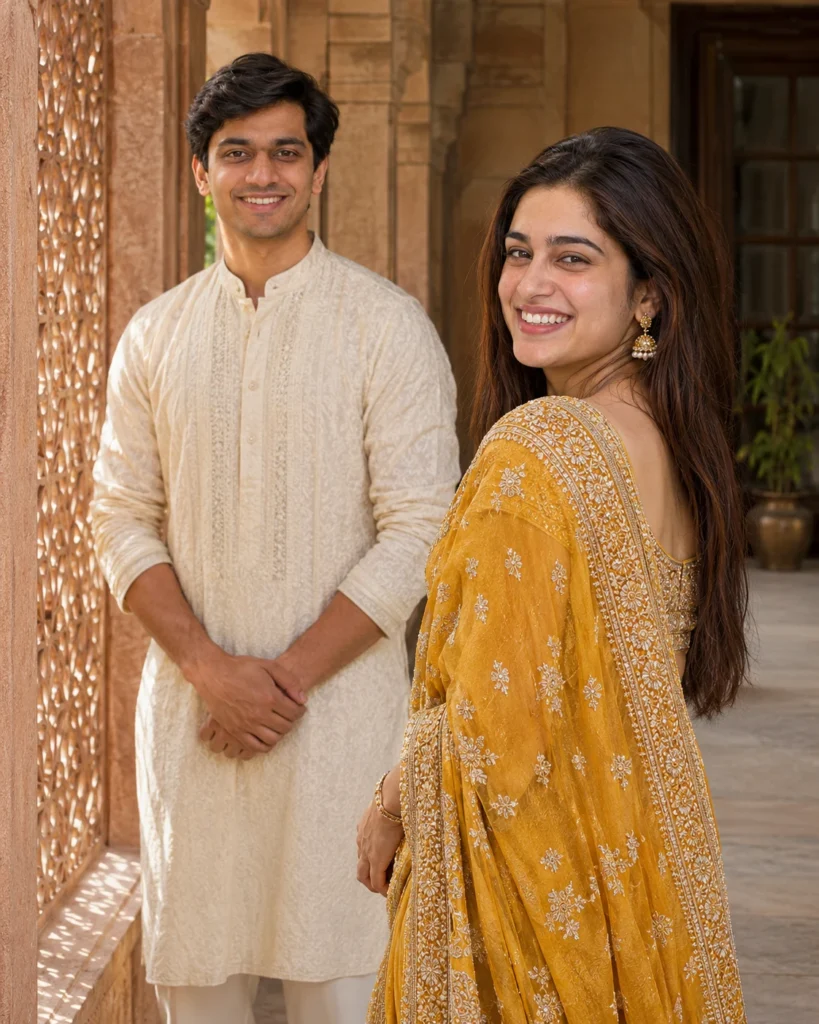
The couple stands on a sandstone veranda with a carved screen to the left with her one step ahead, turning her head back over her shoulder while he looks toward the camera. Frame both from the knees up in side light from the open veranda.

Styling: a cream kurta for him and a golden-yellow saree with dense embroidered borders for her.

Warm reflected light and quiet formality. Real photo look, natural skin texture, true-to-life colours, crisp detail. 4:5 frame. No watermark.
Collections and similar looks
Share
Help for this look
How to make it, tips, answers and quick fixes. Tap a row to open it.
What this prompt creates
Turn back over your shoulder while your partner stands a step behind you on a sandstone veranda. Your golden-yellow saree carries a wide sweep of embroidery across the shoulder, and the cream kurta behind it keeps the colours warm and simple. The picture takes in both of you down to the knees. Light from the open side brushes your faces and picks up the raised stitches.
Make it yours
- Switch to a mustard saree with an ochre border.
- Try a cream kurta with a band collar.
- Replace the stone veranda with an airy plaster corridor.
Want to know more? Read about sarees on Wikipedia.
How to make this golden saree shoulder glance couple photo
- Pick a clear photo of you both
Face towards the camera in good light. Any outfit is fine; the prompt changes it.
- Copy the prompt
Try ochre embroidery on a lighter yellow saree.
- Paste with your photo
Open ChatGPT or Gemini, upload your photo, paste and send.
- Fine-tune it
Ask for a clear gap between both faces.
Tips for this look
- Upload one clear photo together or one of each of you.
- Choose photos where both faces get even light.
- Use 4:5 for a portrait post.
- Choose a clear photo where both sets of eyes are visible.
- For the turning pose, use an extra shoulder-angle picture if you have one.
- Use an upload with the shoulders and upper body in frame.
Quick answers
Can he look at me instead?
Yes. Ask him to turn his eyes toward you while keeping his chin up.
Will the saree border show?
Ask for a knee-up crop with the border visible along your shoulder.
Common problems and quick fixes
👥 Our faces got mixed
Keep the first lines of the prompt: they tell the tool to keep you two separate. Two separate clear photos also help.
🟠 Everything looks too yellow or orange
Reply “keep the colours natural and my skin tone true, less orange cast”.
👗 The outfit colour isn’t right
Use the outfit quick change, or reply “make the outfit exactly [colour]”.
🎨 Skin looks too smooth
Reply “keep my natural skin texture, no beauty filter”. Small follow-ups work better than starting over.
More couple looks
Similar looks, picked by style and occasion.