Coming up: Christmas
 Find my look in 3 taps

















































 Boys
Luxury Red Background Portrait AI Photo Prompt for Boys
Copy this AI photo prompt for boys below and paste it into ChatGPT or Gemini with your own photo.
Your prompt
Edit the uploaded photo. Use the person in it as the identity reference. Keep their face shape, eyes, nose, lips, skin tone, age and hair exactly as they are. No face reshaping, no plastic-smooth skin.

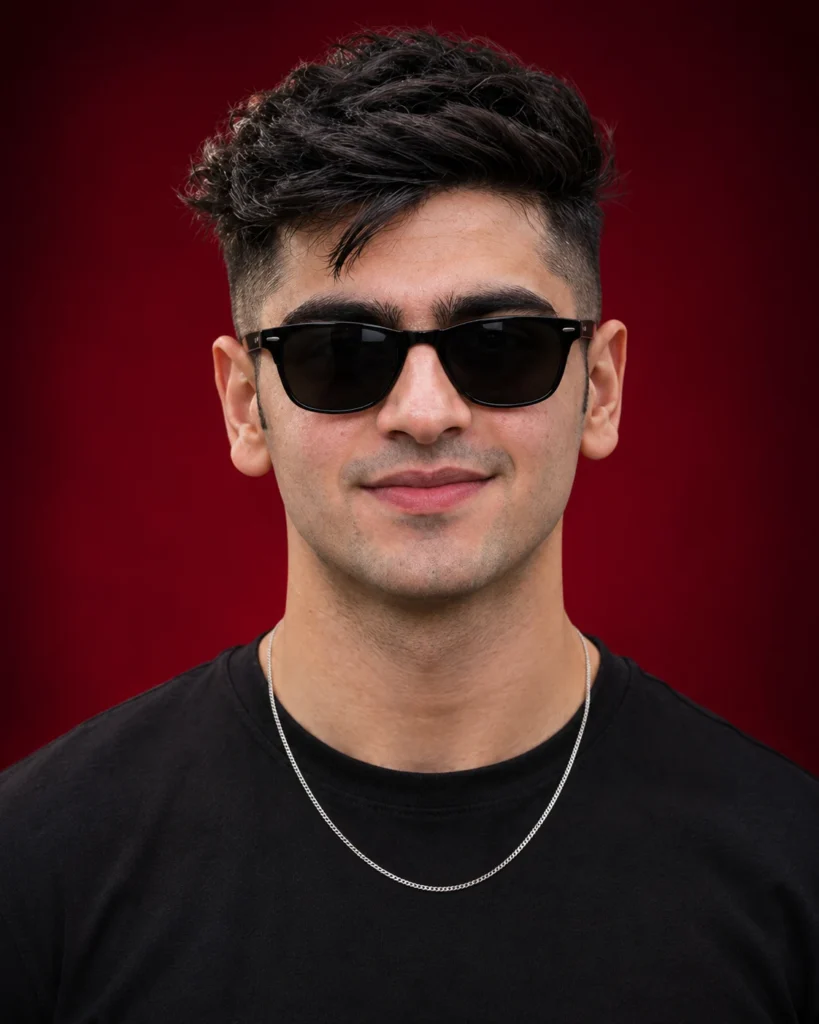
A chest-up studio portrait of the person standing straight in front of a deep red studio backdrop with a soft dark vignette at the edges, facing the camera with a calm, confident look and a tiny half-smile.

Styling: a plain black crew-neck t-shirt, black sunglasses and a thin silver chain.

Single soft key light from the front-left, deep reds and blacks, glossy luxury-ad finish. Real photo look, natural skin texture, true-to-life colours, crisp detail. 4:5 frame. No watermark.
Collections and similar looks
Share
Help for this look
How to make it, tips, answers and quick fixes. Tap a row to open it.
What this prompt creates
A chest-up studio portrait of him standing straight in front of a deep red backdrop that darkens toward the edges. He wears a plain black crew-neck t-shirt, black sunglasses and a thin silver chain, facing the camera with a calm, confident look and a tiny half-smile.
Make it yours
- Change the backdrop to deep emerald green.
- Add a black blazer over the t-shirt.
- Take the sunglasses off to show your eyes.
Want to know more? Read about low-key lighting on Wikipedia.
How to make this luxury red background portrait
- Pick a clear photo
Face towards the camera in good light. Any outfit is fine; the prompt changes it.
- Copy the prompt
Change the backdrop to deep emerald green.
- Paste with your photo
Open ChatGPT or Gemini, upload your photo, paste and send.
- Fine-tune it
Reply “take off the sunglasses” to show your eyes.
Tips for this look
- A sharp, front-facing photo works best.
- A black blazer makes it more formal.
- Use 4:5 or 1:1.
- Upload a photo without sunglasses so your face is kept right.
- A neutral or slight-smile expression suits the mood.
Quick answers
Can I use it as a DP?
Yes. Use 1:1 for a profile picture.
Is there a girls version?
Yes. See the red background portrait for girls.
Common problems and quick fixes
😕 My face doesn’t look like me
Use a sharper, front-facing photo in daylight, then reply “keep my face exactly as in my photo, only change the scene”.
🌙 My face looks too dark
Reply “add soft warm light on my face, keep the background the same”.
👗 The outfit colour isn’t right
Use the outfit quick change, or reply “make the outfit exactly [colour]”.
🎨 Skin looks too smooth
Reply “keep my natural skin texture, no beauty filter”. Small follow-ups work better than starting over.
More looks for boys
Similar looks, picked by style and occasion.