Coming up: Christmas
 Find my look in 3 taps














































 🪔 Festive
Merry Christmas Greeting Card AI Photo Prompt with Name
Copy this AI photo prompt for girls below and paste it into ChatGPT or Gemini with your own photo.
Your prompt
Edit the uploaded photo. Use the person in it as the identity reference. Keep their face shape, eyes, nose, lips, skin tone, age and hair exactly as they are. No face reshaping, no plastic-smooth skin.

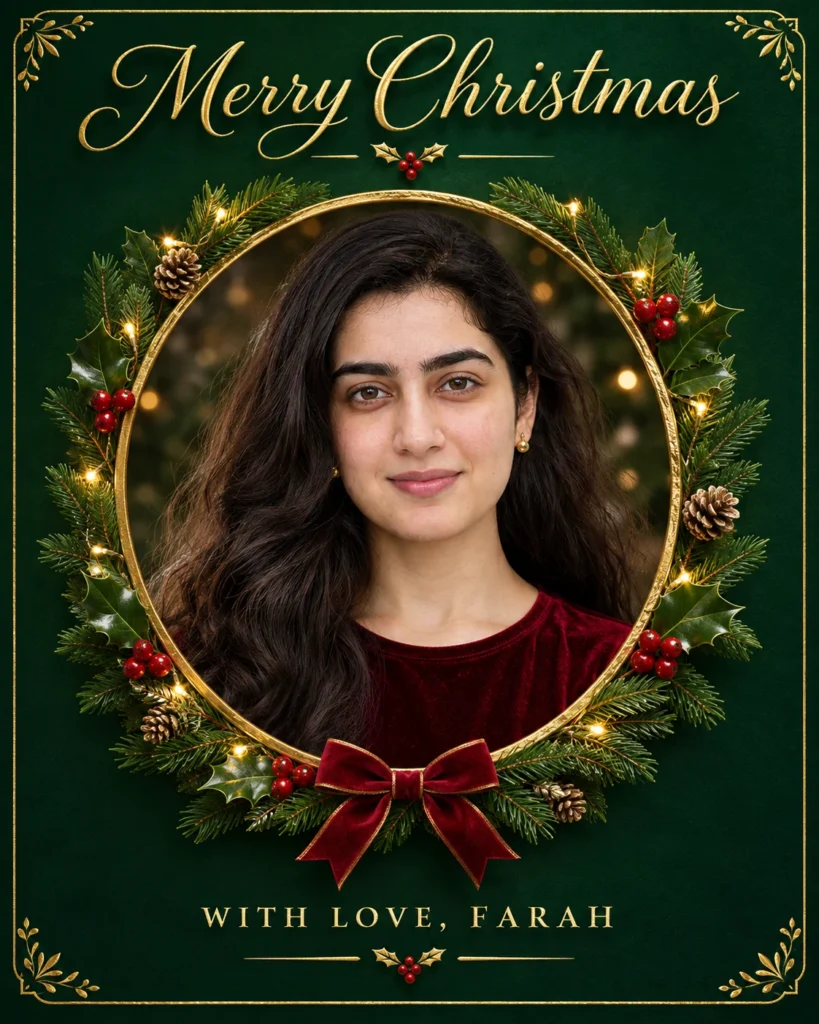
Make a premium Christmas greeting card from a real photo of the person: a smiling head-and-shoulders portrait sits inside a round gold wreath frame of pine leaves, holly berries and tiny lights on a deep green card. At the top in gold script: “Merry Christmas”. At the bottom in clean small caps: “with love, [YOUR NAME]”.

Styling: a deep red velvet top and small gold earrings.

Luxury print finish with gold foil shine, natural real-photo face. 4:5 frame. No watermark.
Collections and similar looks
Share
Help for this look
How to make it, tips, answers and quick fixes. Tap a row to open it.
What this prompt creates
A premium greeting card in deep green: your smiling head-and-shoulders portrait sits inside a round wreath of pine leaves, holly berries and tiny lights. Gold script at the top says Merry Christmas, and at the bottom, in neat small capitals, it reads with love followed by your name. The gold has a foil-like shine, while your face stays natural.
Make it yours
- Write both names for a couple card, like with love, Riya and Varun.
- Change deep green to maroon or navy.
- Ask for a red velvet ribbon tied at the top of the wreath.
Want to know more? Read about Christmas cards on Wikipedia.
How to make this Merry Christmas greeting card photo
- Pick a clear photo
Face towards the camera in good light. Any outfit is fine; the prompt changes it.
- Copy the prompt
Replace [YOUR NAME] with your name before you send the prompt.
- Paste with your photo
Open ChatGPT or Gemini, upload your photo, paste and send.
- Fine-tune it
Reply “fix the spelling of the name” if a letter is off.
Tips for this look
- Keep the name short for neat text.
- Send it on WhatsApp on Christmas morning.
- Change deep green to navy or maroon.
- Replace the name placeholder before you send the prompt.
- A front-facing smiling photo fits the round frame best.
- Short names give the cleanest lettering.
Quick answers
Where do I write my name?
Replace [YOUR NAME] in the prompt with your name.
Can I make it for a couple?
Yes. Upload both photos and write both names, like “with love, Riya & Varun”.
Common problems and quick fixes
😕 My face doesn’t look like me
Use a sharper, front-facing photo in daylight, then reply “keep my face exactly as in my photo, only change the scene”.
🔤 The words are spelt wrong
Reply “fix the spelling, it should read: …” with the exact words. Short names come out cleanest.
👗 The outfit colour isn’t right
Use the outfit quick change, or reply “make the outfit exactly [colour]”.
🎨 Skin looks too smooth
Reply “keep my natural skin texture, no beauty filter”. Small follow-ups work better than starting over.
More looks for girls
Similar looks, picked by style and occasion.