Coming up: Christmas
 Find my look in 3 taps


















































 Portrait
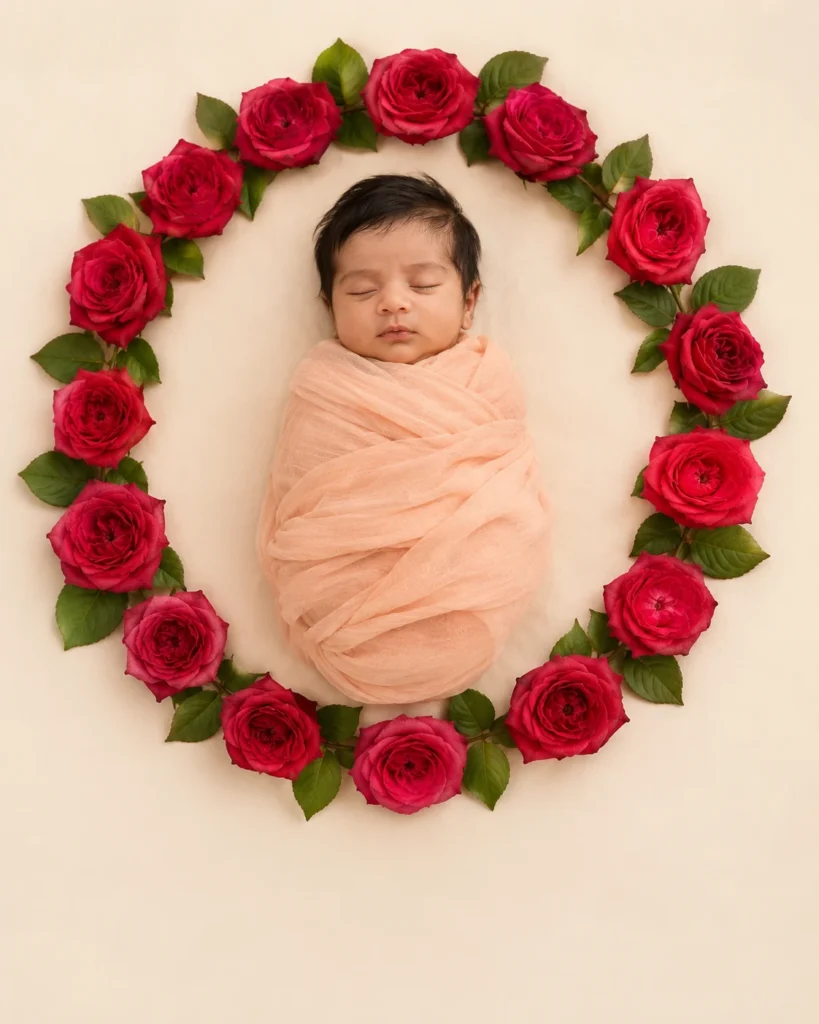
Peach Muslin and Rose Ring Newborn AI Photo Prompt
Copy this family AI photo prompt below and paste it into ChatGPT or Gemini with a photo of your family.
Your prompt
Edit the uploaded photo of the child. Use the child in it as the identity reference. Keep the face shape, eyes, nose, lips, skin tone, age and hair exactly as they are. Keep the child looking their real age; no makeup, no face reshaping.

At a cream backdrop with a flat circle of fresh rose heads and green leaves around an open centre, photograph a sleeping newborn straight from above, lying on their back in the open centre with eyes gently closed. Keep the flower ring fully in frame with clear space around the baby and room near the lower edge for a small wooden tag if requested (omit the tag by default).

Styling: a soft peach muslin swaddle with the baby's face clear.

Soft top light, warm cream, peach folds and natural rose petals. Natural skin texture, clear detail and a photographic finish. 4:5 frame. No watermark. No flags, religious or devotional elements, idols, deities, temples in focus, scripture, calligraphy, Diwali or Dhanteras imagery, celebrity likenesses or real brand logos. Natural anatomy: two arms, five fingers on each visible hand, no extra or merged fingers.
Collections and similar looks
Share
Help for this look
How to make it, tips, answers and quick fixes. Tap a row to open it.
What this prompt creates
Seen straight from above, a sleeping newborn lies on their back in a peach muslin swaddle, with a circle of roses and fresh green leaves laid on the cream backdrop. The open centre leaves room around the baby's uncovered face. Soft top light shows the folds in the muslin and the petals around the frame. A small wooden name tag can sit near the lower edge.
Make it yours
- Choose cream or soft pink roses.
- Add a first name on a small wooden tag.
- Use an ivory swaddle for a paler centre.
Want to know more? Read about swaddling on Wikipedia.
How to make this peach muslin and rose ring newborn photo
- Pick a clear photo of your child
Face towards the camera in good light. Any outfit is fine; the prompt changes it.
- Copy the prompt
Add your baby’s first name if you want a wooden tag.
- Paste with your photo
Open ChatGPT & Gemini, upload your photo, paste and send.
- Fine-tune it
Ask for the roses to stay around the outside of the open centre.
Tips for this look
- Use a clear photo of the baby’s face.
- Try a photo taken in soft, even daylight.
- Choose a reference where the face is free of fabric.
- Pick a baby photo with the whole face visible.
- Use soft light so small features and skin tone are clear.
- A sleeping reference fits the quiet expression.
Quick answers
Can I leave the wooden tag out?
Yes. Leave the name blank to omit the tag.
Can I choose the rose colour?
Yes. Soft pink or cream goes well with peach muslin.
Common problems and quick fixes
😕 My face doesn’t look like me
Use a sharper, front-facing photo in daylight, then reply “keep my face exactly as in my photo, only change the scene”.
🔤 The words are spelt wrong
Reply “fix the spelling, it should read: …” with the exact words. Short names come out cleanest.
✋ Hands or fingers look odd
Reply “fix the hands and fingers, keep everything else the same”.
👶 The child’s face changed
Reply “keep the child’s face exactly as in my photo”. Add a clear photo of the child if you can.
More family looks
Similar looks, picked by style and occasion.