Coming up: Christmas
 Find my look in 3 taps















































 Boys
Music Doodle Poster AI Photo Prompt for Boys
Copy this AI photo prompt for boys below and paste it into ChatGPT or Gemini with your own photo.
Your prompt
Edit the uploaded photo. Use the person in it as the identity reference. Keep their face shape, eyes, nose, lips, skin tone, age and hair exactly as they are. No face reshaping, no plastic-smooth skin.

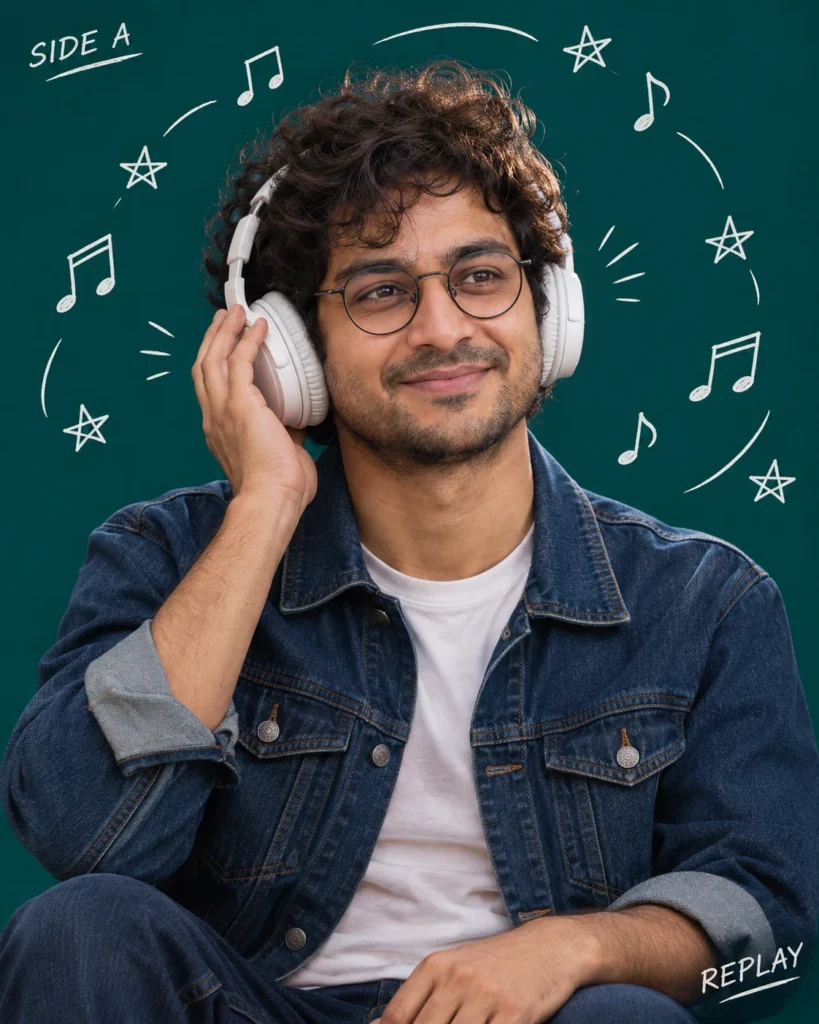
Against a flat deep teal background with white hand-drawn music notes, stars and the small words "SIDE A" and "REPLAY" spaced around the edges, the person cups one ear pad and turns his face into soft light from the right for a waist-up portrait. Spread the white doodles in an uneven arc around his shoulders and head, with clean teal space around his eyes.

Styling: an indigo denim jacket over a white tee and oversized white over-ear headphones.

Even studio light, deep teal and white ink give the portrait a handmade music-poster feel. Real photo look, natural skin texture, true-to-life colours, crisp detail. 4:5 frame. No watermark.
Collections and similar looks
Share
Help for this look
How to make it, tips, answers and quick fixes. Tap a row to open it.
What this prompt creates
Big white headphones and an indigo denim jacket stand out against flat teal as you press a hand to one ear pad. Your face turns slightly towards soft light from the right. Around your shoulders and above your head, white notes, stars and the words SIDE A and REPLAY trace a loose arc. A clean pocket of teal keeps attention on your expression.
Make it yours
- Put your playlist name in place of REPLAY.
- Change the tee to pale grey.
- Swap some stars for tiny sound waves.
Want to know more? Read about doodles on Wikipedia.
How to make this music doodle poster photo
- Pick a clear photo
Face towards the camera in good light. Any outfit is fine; the prompt changes it.
- Copy the prompt
Swap REPLAY for the name of your playlist.
- Paste with your photo
Open ChatGPT & Gemini, upload your photo, paste and send.
- Fine-tune it
Ask for bigger gaps around the glasses and headphones.
Tips for this look
- Upload a waist-up photo with room above your head.
- Choose even light and a relaxed expression.
- Keep each word short so the letters have room.
- Choose a waist-up upload with space above your head.
- Keep your ears and shoulders visible.
- Try an expression you would make while listening to a favourite track.
Quick answers
Do I need headphones in my source photo?
A plain portrait works. The prompt adds the headphones.
Can I use this for a playlist cover?
Yes. Ask for a square frame and keep the lettering inside the edges.
Common problems and quick fixes
😕 My face doesn’t look like me
Use a sharper, front-facing photo in daylight, then reply “keep my face exactly as in my photo, only change the scene”.
🔤 The words are spelt wrong
Reply “fix the spelling, it should read: …” with the exact words. Short names come out cleanest.
👗 The outfit colour isn’t right
Use the outfit quick change, or reply “make the outfit exactly [colour]”.
🎨 Skin looks too smooth
Reply “keep my natural skin texture, no beauty filter”. Small follow-ups work better than starting over.
More looks for boys
Similar looks, picked by style and occasion.