Coming up: Christmas
 Find my look in 3 taps















































 🪔 Festive
Welcome 2027 Mountain Journey Poster AI Photo Prompt for Boys
Copy this AI photo prompt for boys below and paste it into ChatGPT or Gemini with your own photo.
Your prompt
Edit the uploaded photo. Use the person in it as the identity reference. Keep their face shape, eyes, nose, lips, skin tone, age and hair exactly as they are. No face reshaping, no plastic-smooth skin.

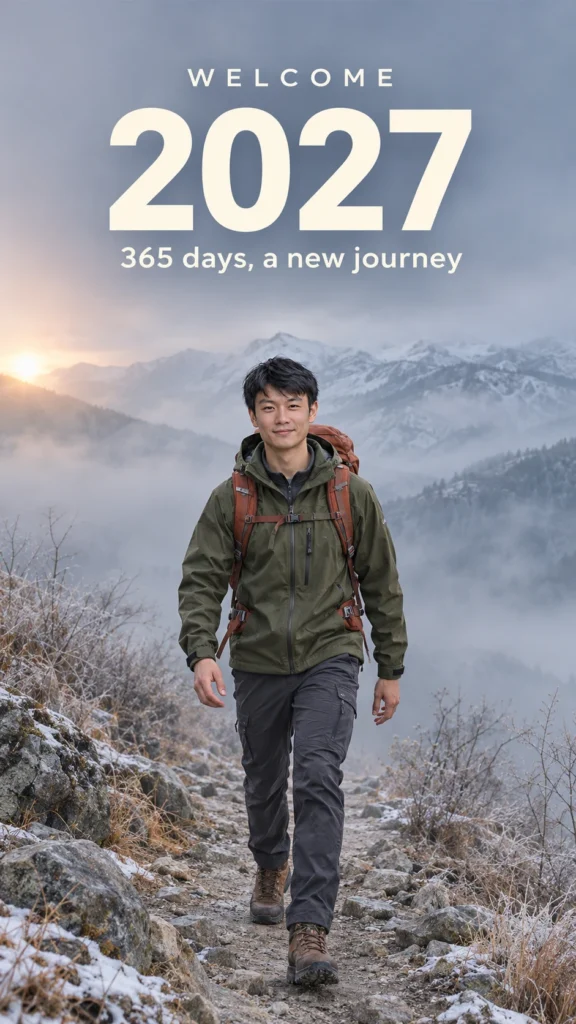
Show the person walking towards the camera in a rocky trail through misty winter mountains, with pale ridges and first light coming from the left, full length and low in the frame. In the open mist above him, put small "WELCOME" over huge ivory numerals "2027", then place "365 days, a new journey" just below the numerals without covering his head.

Styling: an olive hiking shell, charcoal trekking trousers, brown boots and a rust backpack.

Cool mist, soft sunrise on the trail and clear poster lettering. Natural skin texture, believable colours and crisp detail. 9:16 frame. No watermark.
Collections and similar looks
Share
Help for this look
How to make it, tips, answers and quick fixes. Tap a row to open it.
What this prompt creates
You walk towards the camera along a rocky mountain trail, with a rust backpack over an olive shell and brown boots on the path. The frame shows you full length with misty ridges rising behind. First light comes in from the left. A small welcome sits above the large ivory year numerals in the mist, with a line about a new journey underneath.
Make it yours
- Choose a backpack colour you already own.
- Use your own short line under the year.
- Use slate blue on the hiking shell.
Want to know more? Read about hiking on Wikipedia.
How to make this welcome 2027 mountain journey poster photo
- Pick a clear photo
Face towards the camera in good light. Any outfit is fine; the prompt changes it.
- Copy the prompt
Swap the backpack colour for one you wear.
- Paste with your photo
Open ChatGPT & Gemini, upload your photo, paste and send.
- Fine-tune it
Leave a band of clear mist around the small line of text.
Tips for this look
- Upload a sharp photo with your face clear.
- Pick an expression that fits the scene.
- Keep the vertical crop for the layout.
- Upload a full-length photo if you have one.
- Keep your face sharp and easy to see.
- A relaxed standing pose gives a clear reference for the walking frame.
Quick answers
Can I fit it on a phone status?
Yes, the tall crop leaves room for the trail and the headline.
Can I replace the subtitle?
Yes, put a short line about your own plans beneath the numerals.
Common problems and quick fixes
😕 My face doesn’t look like me
Use a sharper, front-facing photo in daylight, then reply “keep my face exactly as in my photo, only change the scene”.
🔤 The words are spelt wrong
Reply “fix the spelling, it should read: …” with the exact words. Short names come out cleanest.
🟠 Everything looks too yellow or orange
Reply “keep the colours natural and my skin tone true, less orange cast”.
👗 The outfit colour isn’t right
Use the outfit quick change, or reply “make the outfit exactly [colour]”.
More looks for boys
Similar looks, picked by style and occasion.