Coming up: Christmas
 Find my look in 3 taps

















































 Girls
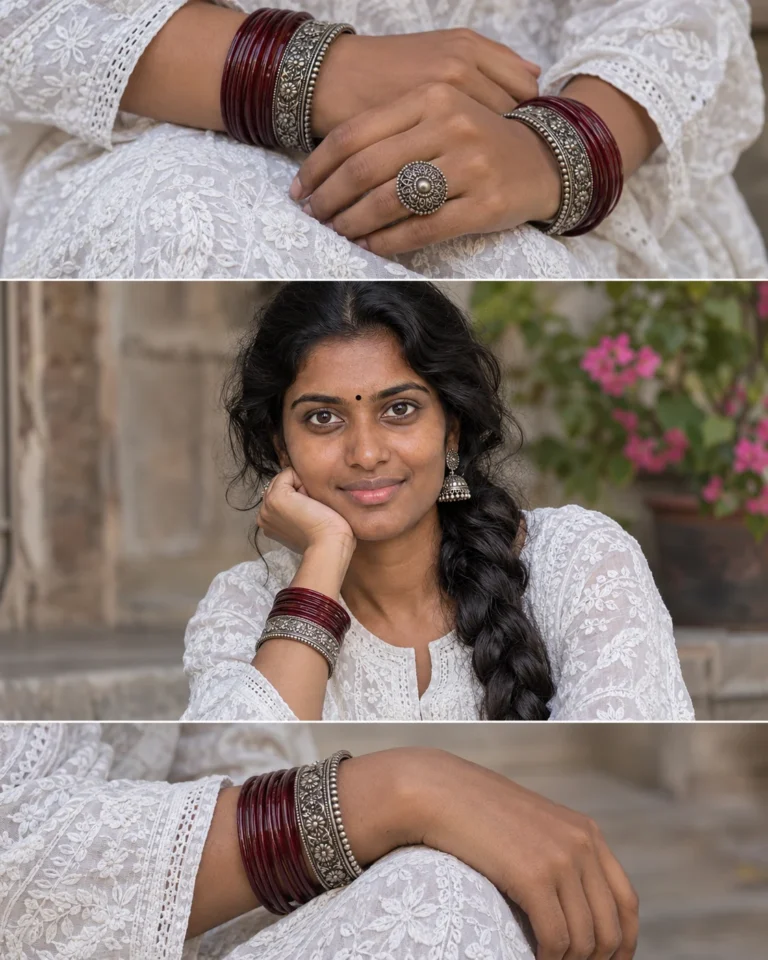
Jhumka, Bindi and Bangles Detail Collage AI Photo Prompt for Girls
Copy this AI photo prompt for girls below and paste it into ChatGPT or Gemini with your own photo.
Your prompt
Edit the uploaded photo. Use the person in it as the identity reference. Keep their face shape, eyes, nose, lips, skin tone, age and hair exactly as they are. No face reshaping, no plastic-smooth skin.

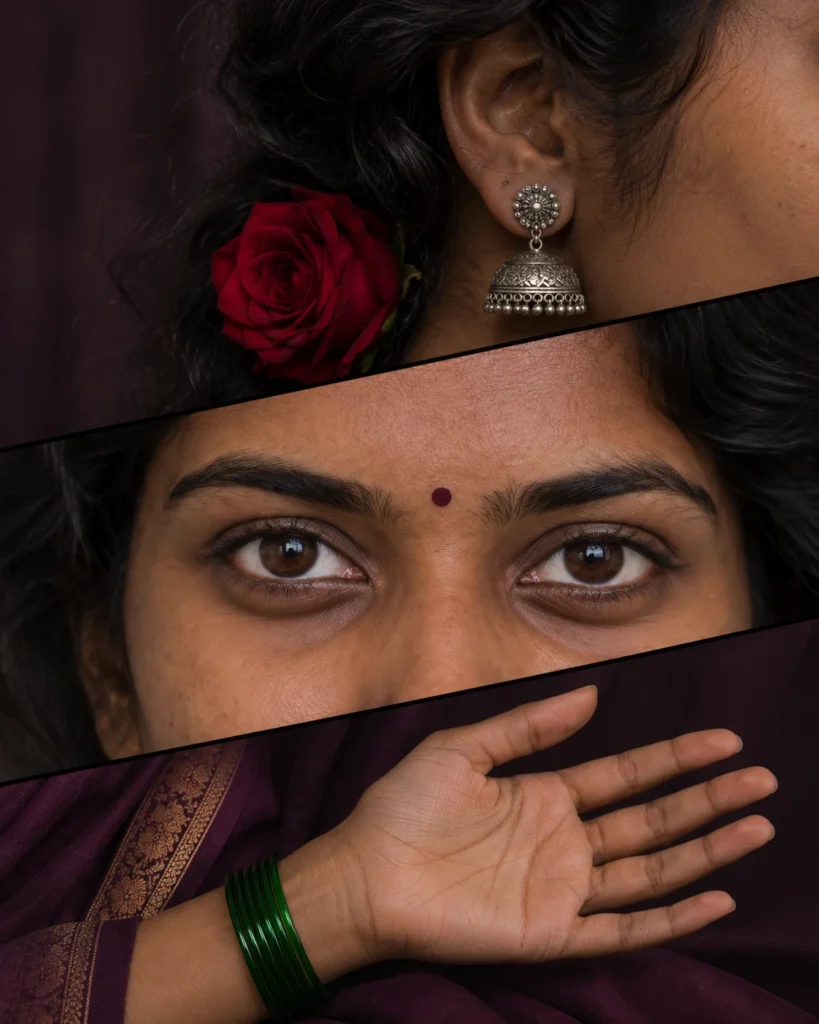
In a dark dressing room with a muted backdrop, make three diagonal detail slices of the person with thin black gaps between them: a jhumka beside a red rose at the top, kajal-lined eyes and a small bindi in the middle, and an open palm with glass bangles at the bottom. Light all three slices softly from one side so the silver, petals and glass pick up narrow highlights.

Styling: a deep plum saree, oxidised silver jhumkas, a tiny maroon bindi and green glass bangles.

Deep plum and black shadows with small silver and bottle-green highlights. Real photo look, natural skin texture, true-to-life colours, crisp detail. 4:5 frame. No watermark.
Collections and similar looks
Share
Help for this look
How to make it, tips, answers and quick fixes. Tap a row to open it.
What this prompt creates
Three slanted slices show different details of you in a dark dressing room. The top pairs an oxidised silver jhumka with a red rose. The middle shows your lined eyes and a tiny maroon bindi, and the bottom takes in your open palm and green glass bangles. Narrow black gaps separate the views, and a soft light from one side runs across the jewellery and petals.
Make it yours
- Swap green bangles for amber ones.
- Try a deeper plum for the saree.
- Ask for a darker red rose.
Want to know more? Read about collage on Wikipedia.
How to make this jhumka, bindi and bangles detail collage
- Pick a clear photo
Face towards the camera in good light. Any outfit is fine; the prompt changes it.
- Copy the prompt
Swap the green bangles for amber glass.
- Paste with your photo
To use this prompt with ChatGPT & Gemini, upload your photo in the app you choose, then paste the prompt and send.
- Fine-tune it
Ask for the black gaps and slice edges to stay clean.
Tips for this look
- Pick a sharp photo of your eyes.
- Keep at least one ear visible.
- Use even light so your skin tone is easy to match.
- Choose a photo that shows your eye shape clearly.
- Keep one ear outside your hair.
- Use a source with even skin colour across the face.
Quick answers
Does it show my full face?
Your eyes and bindi are framed in the middle slice.
Can I use a different flower?
Yes. Replace the rose with a flower that fits your colours.
Common problems and quick fixes
😕 My face doesn’t look like me
Use a sharper, front-facing photo in daylight, then reply “keep my face exactly as in my photo, only change the scene”.
🖼️ My face changes between frames
Reply “keep my face identical in every frame”. Uploading 2–3 photos of yourself also helps.
✋ Hands or fingers look odd
Reply “fix the hands and fingers, keep everything else the same”.
👗 The outfit colour isn’t right
Use the outfit quick change, or reply “make the outfit exactly [colour]”.
More looks for girls
Similar looks, picked by style and occasion.