Coming up: Christmas
 Find my look in 3 taps

















































 Boys
Men’s Hairstyle Style Card AI Photo Prompt for Boys
Copy this AI photo prompt for boys below and paste it into ChatGPT or Gemini with your own photo.
Your prompt
Edit the uploaded photo. Use the person in it as the identity reference. Keep their face shape, eyes, nose, lips, skin tone, age and hair colour exactly as they are. No face reshaping, no plastic-smooth skin. Restyle the hair as described below.

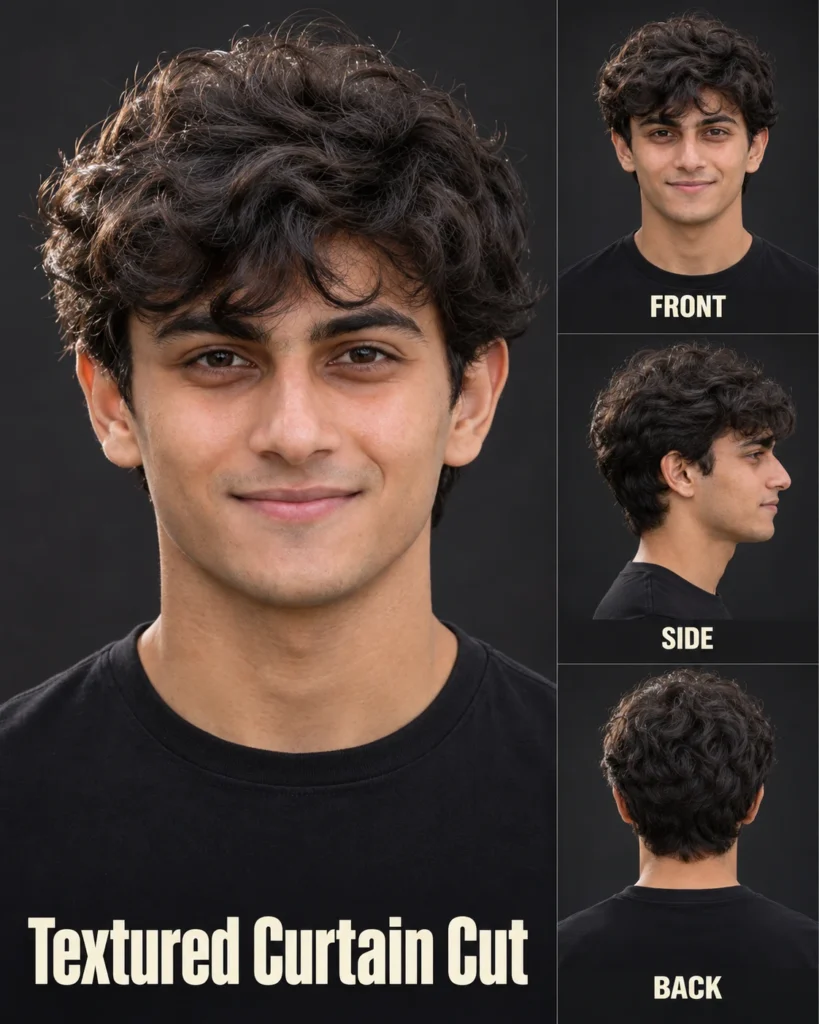
On a dark charcoal studio card with soft light from upper left and a narrow column of three evenly spaced photo panels on the right, place a large front portrait of the person on the left and three smaller head views of him on the right, labelled "FRONT", "SIDE" and "BACK" from top to bottom. Style his hair as a "Textured Curtain Cut" in all four views, using a loose centre part, airy layered fringe and a softly tapered nape for the curtain-cut version, and print the exact cut name in bold condensed type at the bottom left.

Styling: a plain black crew-neck tee in every view.

Clean studio light with a soft rim highlight to show the hair shape against charcoal, and sharp cream lettering. Real photo look with natural skin texture and fine detail. 4:5 frame. No watermark, flags, religious or devotional elements, Diwali references or celebrity likenesses.
Collections and similar looks
Share
Help for this look
How to make it, tips, answers and quick fixes. Tap a row to open it.
What this prompt creates
A large front portrait of you fills the left side of a charcoal card. Three smaller portraits stack on the right with the labels FRONT, SIDE and BACK. Each shows the same haircut, with an airy centre-parted fringe and a softly tapered nape in the sample style. The black crew-neck tee stays the same across the card, and big cream lettering gives the cut its name at the bottom left.
Make it yours
- Try a side-parted cut and describe the shape you want.
- Use a dark slate tee for a little more separation.
- Make the labels a warmer ivory.
Want to know more? Read about curtained hair on Wikipedia.
How to make this men’s hairstyle style card photo
- Pick a clear photo
Face towards the camera in good light. Any outfit is fine; the prompt changes it.
- Copy the prompt
Replace the haircut name and describe its fringe, sides and nape if you switch styles.
- Paste with your photo
Use this prompt with ChatGPT & Gemini. In your chosen app, upload your photo, paste the prompt and send.
- Fine-tune it
Ask for more rim light around the back view.
Tips for this look
- Choose a sharp front-facing portrait.
- Keep both temples and the top of your head in view.
- Use soft light so the hairline is easy to see.
- Choose an eye-level portrait taken straight ahead.
- Show both temples and leave room above your head.
- Take off hats and use even light across your hairline.
Quick answers
Do I upload a back photo?
One clear front photo is enough for the prompt to create the other views.
Does the card show different cuts?
It shows the same haircut from several angles.
Common problems and quick fixes
😕 My face doesn’t look like me
Use a sharper, front-facing photo in daylight, then reply “keep my face exactly as in my photo, only change the scene”.
🔤 The words are spelt wrong
Reply “fix the spelling, it should read: …” with the exact words. Short names come out cleanest.
👗 The outfit colour isn’t right
Use the outfit quick change, or reply “make the outfit exactly [colour]”.
🎨 Skin looks too smooth
Reply “keep my natural skin texture, no beauty filter”. Small follow-ups work better than starting over.
More looks for boys
Similar looks, picked by style and occasion.