Coming up: Christmas
 Find my look in 3 taps

















































 Boys
Blue Ink Splash Double Portrait AI Photo Prompt for Boys
Copy this AI photo prompt for boys below and paste it into ChatGPT or Gemini with your own photo.
Your prompt
Edit the uploaded photo. Use the person in it as the identity reference. Keep their face shape, eyes, nose, lips, skin tone, age and hair exactly as they are. No face reshaping, no plastic-smooth skin.

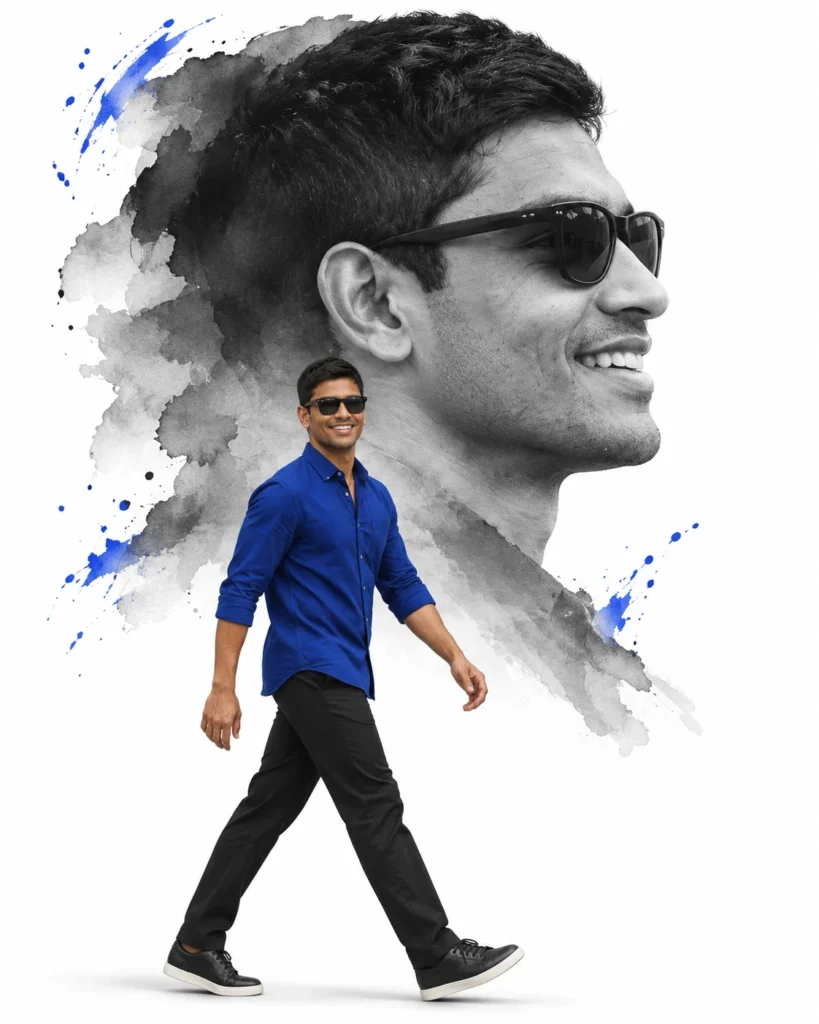
On a seamless clean white gallery-print background, show the person walking full-length across the lower foreground, with a huge black-and-white side profile of the same man in sunglasses behind him. Form the profile from layered black ink washes and scattered drops, with a few royal-blue paint splashes around its outer edge and open white space around the figure.

Styling: a royal-blue shirt, black trousers and dark sunglasses.

Soft studio light on the realistic walking figure, dense black ink fading to grey on the painted profile, and a matte fine-art print finish. 4:5 frame. No watermark.
Collections and similar looks
Share
Help for this look
How to make it, tips, answers and quick fixes. Tap a row to open it.
What this prompt creates
A full-length figure in a royal-blue shirt, black trousers and dark sunglasses walks across the lower part of a white print. Behind him, a much larger view of his own face in profile takes shape in black ink. Pale washes soften the edge of the face, while scattered drops and a few blue splashes carry the movement out towards the empty white space.
Make it yours
- Pair a forest-green shirt with green splashes.
- Make the ink lighter around the jaw.
- Try a slower step with the head turned slightly.
Want to know more? Read about ink wash painting on Wikipedia.
How to make this blue ink splash double portrait
- Pick a clear photo
Face towards the camera in good light. Any outfit is fine; the prompt changes it.
- Copy the prompt
Match a deep green shirt with a few green paint splashes.
- Paste with your photo
Open ChatGPT or Gemini, upload your photo, paste and send.
- Fine-tune it
Ask for the ink to leave the walking figure’s outline clear.
Tips for this look
- Start with a sharp three-quarter portrait.
- Keep the jaw and hairline visible.
- If you use a walking photo, keep both shoes in frame.
- Use a sharp photo taken a little to one side.
- Pick a photo that shows both the hairline and jaw.
- If you send a walking reference, keep the shoes visible.
Quick answers
Is the walking figure painted too?
The walking figure has a regular photo finish and the large profile is made from ink.
Can I use my own sunglasses?
Yes. Pick a photo where the frames are easy to see.
Common problems and quick fixes
😕 My face doesn’t look like me
Use a sharper, front-facing photo in daylight, then reply “keep my face exactly as in my photo, only change the scene”.
💨 My face came out blurred
Reply “keep my face sharp, blur only the background and the moving parts”.
👗 The outfit colour isn’t right
Use the outfit quick change, or reply “make the outfit exactly [colour]”.
🎨 Skin looks too smooth
Reply “keep my natural skin texture, no beauty filter”. Small follow-ups work better than starting over.
More looks for boys
Similar looks, picked by style and occasion.