Coming up: Christmas
 Find my look in 3 taps

















































 💑 Couple
Airport Departure Passports Couple AI Photo Prompt
Copy this couple AI photo prompt below and paste it into ChatGPT or Gemini with a photo of you both.
Your prompt
Edit the uploaded photo of two people. Use each person as their own identity reference and keep both faces exactly as they are: face shape, eyes, nose, lips, skin tone, age and hair. Keep the two people clearly separate; do not blend their features.

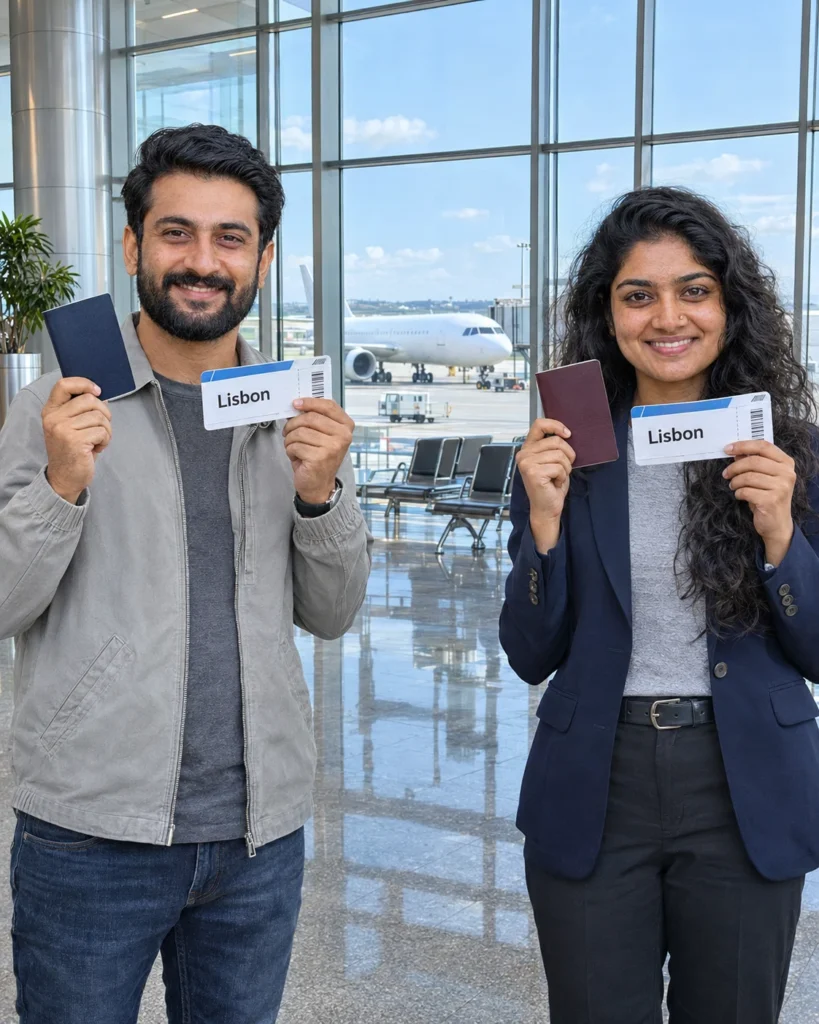
In an airport departures lounge with a tall glass window looking onto a parked white plane, the couple grin and each hold up a closed plain passport and a sample boarding pass beside their face, with 'Lisbon' as the only legible text on each pass. Shoot at eye level with the parked plane visible between them and the window light reflecting off the floor.

Styling: a light grey jacket for him and a navy travel blazer for her.

Bright terminal daylight with crisp paper edges. Real photo look, natural skin texture, true-to-life colours, crisp detail. 4:5 frame. No watermark, flags, religious or devotional elements, or celebrity likenesses.
Collections and similar looks
Share
Help for this look
How to make it, tips, answers and quick fixes. Tap a row to open it.
What this prompt creates
You both grin at the camera at a tall departures window, with a white passenger plane visible between you. Each of you holds a closed passport and a sample boarding pass up beside your face. 'Lisbon' is printed on both passes. Bright window light reaches the grey jacket and navy blazer and leaves a soft reflection across the floor of the lounge.
Make it yours
- Change Lisbon to your destination.
- Switch his jacket to olive.
- Move the plane slightly farther across the window.
Want to know more? Read about boarding passes on Wikipedia.
How to make this airport departure passports couple photo
- Pick a clear photo of you both
Face towards the camera in good light. Any outfit is fine; the prompt changes it.
- Copy the prompt
Replace Lisbon with your destination.
- Paste with your photo
Use this prompt with ChatGPT & Gemini. In your chosen app, upload your photo, paste the prompt and send.
- Fine-tune it
Keep both passes at cheek level so eyes stay clear.
Tips for this look
- One clear photo of each person works.
- Separate photos are fine.
- Use 4:5.
- Use portraits that show both sets of eyes clearly.
- Pick references with broad, relaxed smiles.
- Face soft daylight in both source photos if you can.
Quick answers
Which photos should we upload?
Use clear portraits of you both.
Can we change the destination?
Yes, replace Lisbon with the city you want.
Common problems and quick fixes
👥 Our faces got mixed
Keep the first lines of the prompt: they tell the tool to keep you two separate. Two separate clear photos also help.
🔤 The words are spelt wrong
Reply “fix the spelling, it should read: …” with the exact words. Short names come out cleanest.
👗 The outfit colour isn’t right
Use the outfit quick change, or reply “make the outfit exactly [colour]”.
🎨 Skin looks too smooth
Reply “keep my natural skin texture, no beauty filter”. Small follow-ups work better than starting over.
More couple looks
Similar looks, picked by style and occasion.