Coming up: Christmas
 Find my look in 3 taps
















































 💑 Couple
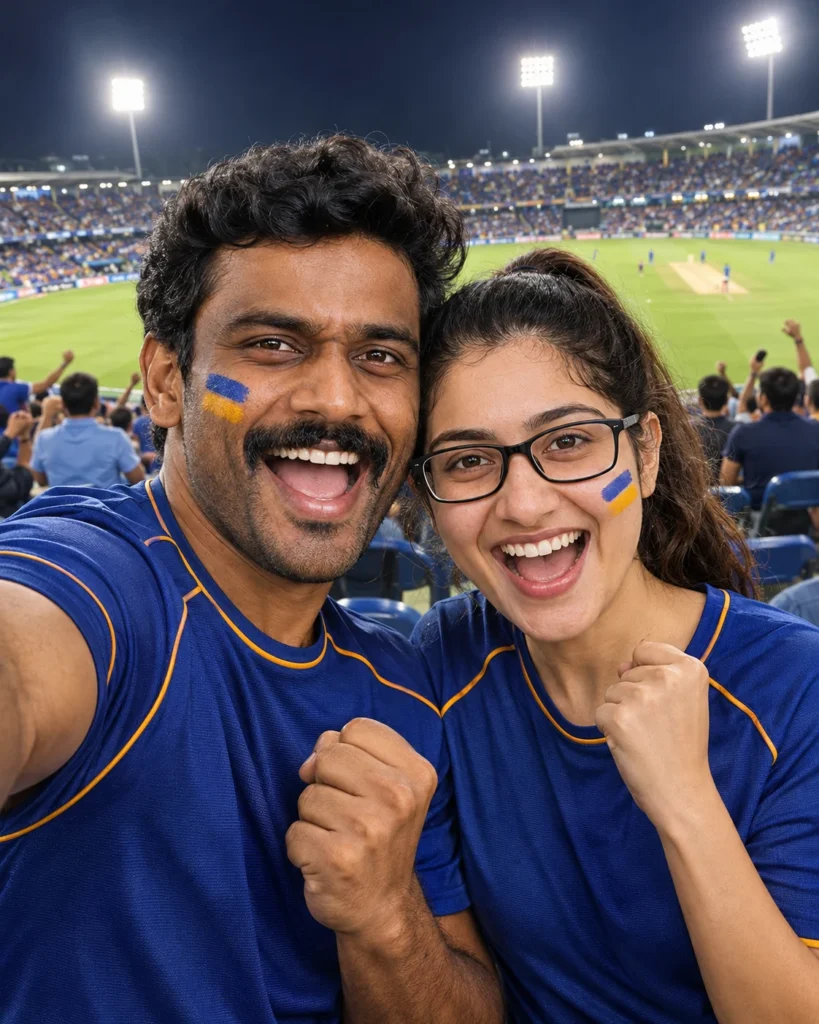
Cricket Stadium Matchday Selfie Couple AI Photo Prompt
Copy this couple AI photo prompt below and paste it into ChatGPT or Gemini with a photo of you both.
Your prompt
Edit the uploaded photo of two people. Use each person as their own identity reference and keep both faces exactly as they are: face shape, eyes, nose, lips, skin tone, age and hair. Keep the two people clearly separate; do not blend their features.

Shoot from the phone's front camera as the couple leans cheek to cheek in the spectator stands of a packed cricket stadium after dark, with the floodlit pitch below and rows of cheering spectators seen from behind, caught mid-cheer, with the pitch visible over their shoulders. Keep the phone outside the frame, the selfie arm at the edge and the stands free of flags and team logos.

Styling: matching cobalt team jerseys with amber piping and plain fronts, with two cobalt and amber face-paint stripes on each person's outer cheek.

Clean floodlight on their faces and a slight wide-angle phone feel, with the packed rows softly blurred. Natural skin texture, believable colours and crisp detail. 4:5 frame. No watermark.
Collections and similar looks
Share
Help for this look
How to make it, tips, answers and quick fixes. Tap a row to open it.
What this prompt creates
From your seats in the packed cricket stands, you both lean cheek to cheek for a selfie just as the crowd cheers. Matching cobalt jerseys have amber edging, and the same two colours appear as stripes on your outer cheeks. The front-camera angle brings your faces close, with the green pitch visible below the floodlights and rows of spectators filling the space over your shoulders.
Make it yours
- Use your own two matchday colours.
- Try grins in place of the mid-cheer pose.
- Raise the phone angle slightly to show more seats.
Want to know more? Read about cricket on Wikipedia.
How to make this cricket stadium matchday selfie couple photo
- Pick a clear photo of you both
Face towards the camera in good light. Any outfit is fine; the prompt changes it.
- Copy the prompt
Use your team’s colours on plain jerseys.
- Paste with your photo
Open ChatGPT & Gemini, upload your photo, paste and send.
- Fine-tune it
Keep enough of the pitch in view to show where you are sitting.
Tips for this look
- Use one clear photo of each of you.
- Choose photos with both eyes visible.
- Keep the 4:5 crop for the full scene.
- Pick photos with an open smile or cheer.
- Check that your outer cheeks are visible in your uploads.
- Use two photos taken at roughly the same eye level.
Quick answers
Can we use different jersey colours?
Yes, pick two colours and repeat them in the cheek stripes.
Does the phone appear in the photo?
The frame is what the front camera sees, so the phone stays outside it.
Common problems and quick fixes
👥 Our faces got mixed
Keep the first lines of the prompt: they tell the tool to keep you two separate. Two separate clear photos also help.
👗 The outfit colour isn’t right
Use the outfit quick change, or reply “make the outfit exactly [colour]”.
🎨 Skin looks too smooth
Reply “keep my natural skin texture, no beauty filter”. Small follow-ups work better than starting over.
🔁 It isn’t quite the look
Regenerate once, or reply with one change at a time, like “wider shot” or “warmer light”.
More couple looks
Similar looks, picked by style and occasion.