Coming up: Christmas
 Find my look in 3 taps















































 💑 Couple
Dark Sand Ocean Shallows Couple AI Photo Prompt
Copy this couple AI photo prompt below and paste it into ChatGPT or Gemini with a photo of you both.
Your prompt
Edit the uploaded photo of two people. Use each person as their own identity reference and keep both faces exactly as they are: face shape, eyes, nose, lips, skin tone, age and hair. Keep the two people clearly separate; do not blend their features.

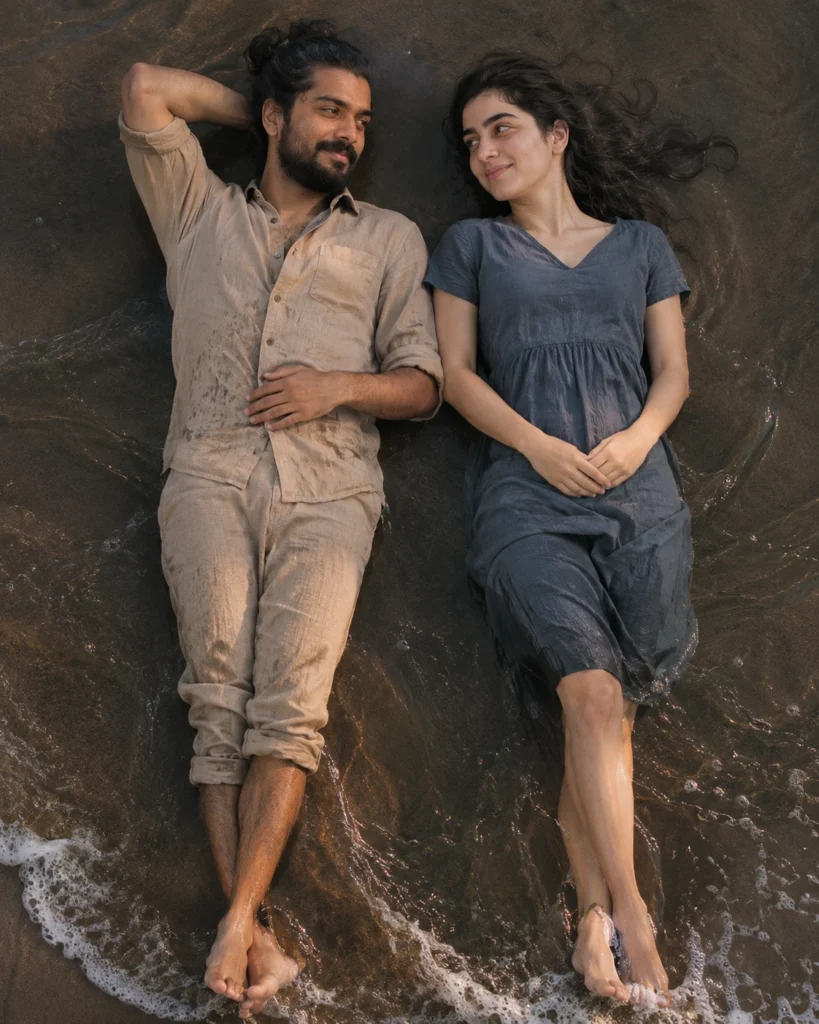
Look straight down on the couple lying side by side in a stretch of dark sand under a thin sheet of seawater at the edge of the ocean, with their faces above the water and their heads turned slightly towards each other. Side light picks out a ribbon of foam around their legs and the ripples on the dark sand.

Styling: a sand-coloured cotton shirt and rolled linen trousers for him, and a slate-blue dress with short sleeves for her.

Fine film grain, muted colours and low, soft coastal light. Real photo look, natural skin texture, true-to-life colours, crisp detail. 4:5 frame. No watermark.
Collections and similar looks
Share
Help for this look
How to make it, tips, answers and quick fixes. Tap a row to open it.
What this prompt creates
Seen from straight above, you both lie shoulder to shoulder where a shallow sheet of seawater covers dark sand. A faint line of foam bends around your legs and side light picks out ripples in the water. Sand-coloured cotton sits beside a slate-blue dress. Your heads turn a little towards each other, with your faces clear of the wash and the water spread out around you.
Make it yours
- Try sea green for the dress.
- Ask for a little more dark sand at the sides.
- Lower the amount of film grain.
Want to know more? Read about aerial photography on Wikipedia.
How to make this dark sand ocean shallows couple photo
- Pick a clear photo of you both
Face towards the camera in good light. Any outfit is fine; the prompt changes it.
- Copy the prompt
Change her dress to a muted sea green.
- Paste with your photo
Open ChatGPT or Gemini, upload your photo, paste and send.
- Fine-tune it
Ask to keep foam below the shoulders.
Tips for this look
- Pick a sharp photo of each face.
- A clear photo together works too.
- Choose 4:5 for a portrait post.
- Use bright photos with both eyes visible.
- Pick easy expressions that work with heads turned.
- Include shoulders in each upload if possible.
Quick answers
How high is the viewpoint?
It looks directly down, with room for water around both bodies.
Can I soften the grain?
Ask for a light film texture so clothing and faces stay clear.
Common problems and quick fixes
👥 Our faces got mixed
Keep the first lines of the prompt: they tell the tool to keep you two separate. Two separate clear photos also help.
🌙 My face looks too dark
Reply “add soft warm light on my face, keep the background the same”.
👗 The outfit colour isn’t right
Use the outfit quick change, or reply “make the outfit exactly [colour]”.
🎨 Skin looks too smooth
Reply “keep my natural skin texture, no beauty filter”. Small follow-ups work better than starting over.
More couple looks
Similar looks, picked by style and occasion.