Coming up: Christmas
 Find my look in 3 taps















































 🪔 Festive
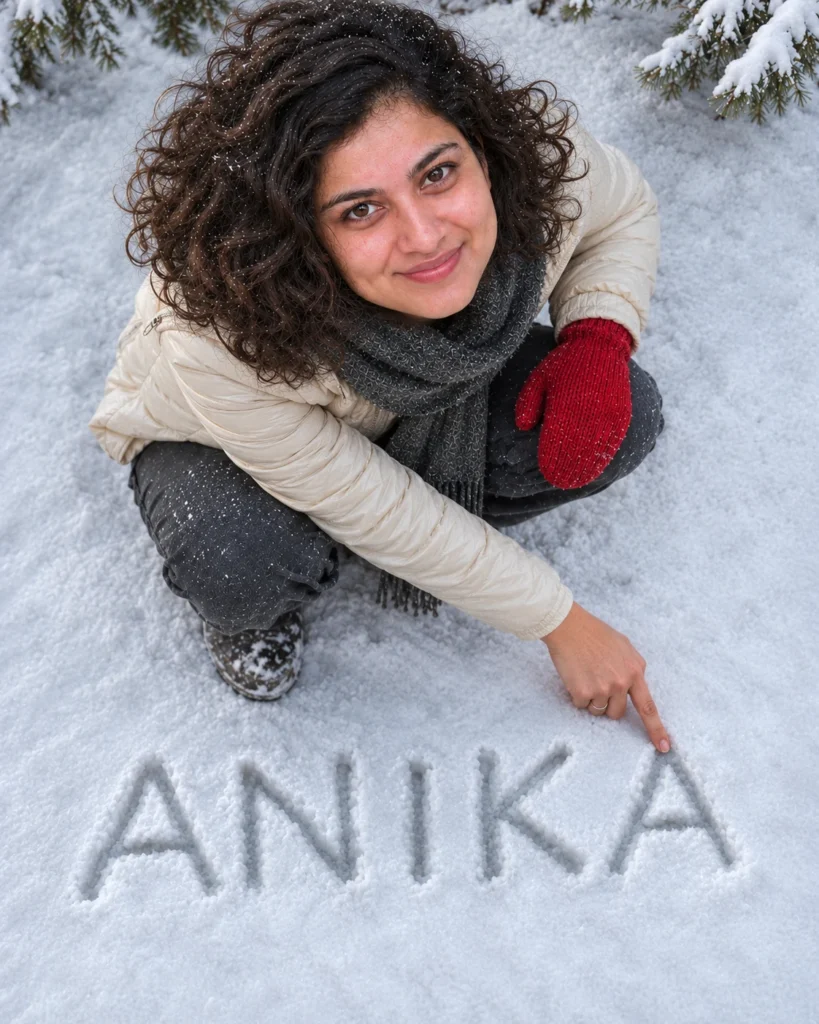
Finger-Written Name in Fresh Snow AI Photo Prompt for Girls
Copy this AI photo prompt for girls below and paste it into ChatGPT or Gemini with your own photo.
Your prompt
Edit the uploaded photo. Use the person in it as the identity reference. Keep their face shape, eyes, nose, lips, skin tone, age and hair exactly as they are. No face reshaping, no plastic-smooth skin.

Use a close, steep overhead angle on the person crouching in a patch of untouched snow at the edge of snowy pines, with soft winter daylight raking across it, her face turned slightly up so it is visible. Show her bare right index finger finishing the last letter of "[NAME]" in the snow, her left red mitten beside the first letter and snowy pine tips at the top edge.

Styling: a cream puffer, a charcoal scarf and red knit mittens, with the right mitten tucked into a coat pocket.

Soft cool daylight, gently shadowed letters and red knit against fresh white snow. Natural skin texture, believable colours and crisp detail. 4:5 frame. No watermark.
Collections and similar looks
Share
Help for this look
How to make it, tips, answers and quick fixes. Tap a row to open it.
What this prompt creates
From just above, the picture catches you crouching under snow-covered pines in a cream puffer and charcoal scarf. Your bare index finger finishes the last letter of your name, and your red mitten rests near the first letter. You turn your face slightly up so it is still visible. Soft daylight falls across the grooves in the fresh snow, with pine tips just inside the frame.
Make it yours
- Trace your initials instead of your first name.
- Swap the cream puffer for a pale blue one.
- Ask for more snow between the letters of a long name.
Want to know more? Read about snow on Wikipedia.
How to make this finger-written name in fresh snow photo
- Pick a clear photo
Face towards the camera in good light. Any outfit is fine; the prompt changes it.
- Copy the prompt
Replace [NAME] with your first name.
- Paste with your photo
Open ChatGPT & Gemini, upload your photo, paste and send.
- Fine-tune it
Ask for wider spacing if your name has many letters.
Tips for this look
- Upload a sharp photo with your face clear.
- Pick an expression that fits the scene.
- Keep the vertical crop for the layout.
- Use a clear photo taken from just above eye level.
- Choose a soft expression that suits a quiet moment.
- Keep your face evenly lit so your features stay clear from the higher angle.
Quick answers
Can I write initials?
Yes, short initials leave more snow around the letters.
How should I angle my upload?
A clear portrait taken slightly above eye level suits the overhead view.
Common problems and quick fixes
😕 My face doesn’t look like me
Use a sharper, front-facing photo in daylight, then reply “keep my face exactly as in my photo, only change the scene”.
🔤 The words are spelt wrong
Reply “fix the spelling, it should read: …” with the exact words. Short names come out cleanest.
✋ Hands or fingers look odd
Reply “fix the hands and fingers, keep everything else the same”.
👗 The outfit colour isn’t right
Use the outfit quick change, or reply “make the outfit exactly [colour]”.
More looks for girls
Similar looks, picked by style and occasion.