Coming up: Christmas
 Find my look in 3 taps

















































 💑 Couple
Gold Moon Name Poster Couple AI Photo Prompt
Copy this couple AI photo prompt below and paste it into ChatGPT or Gemini with a photo of you both.
Your prompt
Edit the uploaded photo of two people. Use each person as their own identity reference and keep both faces exactly as they are: face shape, eyes, nose, lips, skin tone, age and hair. Keep the two people clearly separate; do not blend their features.

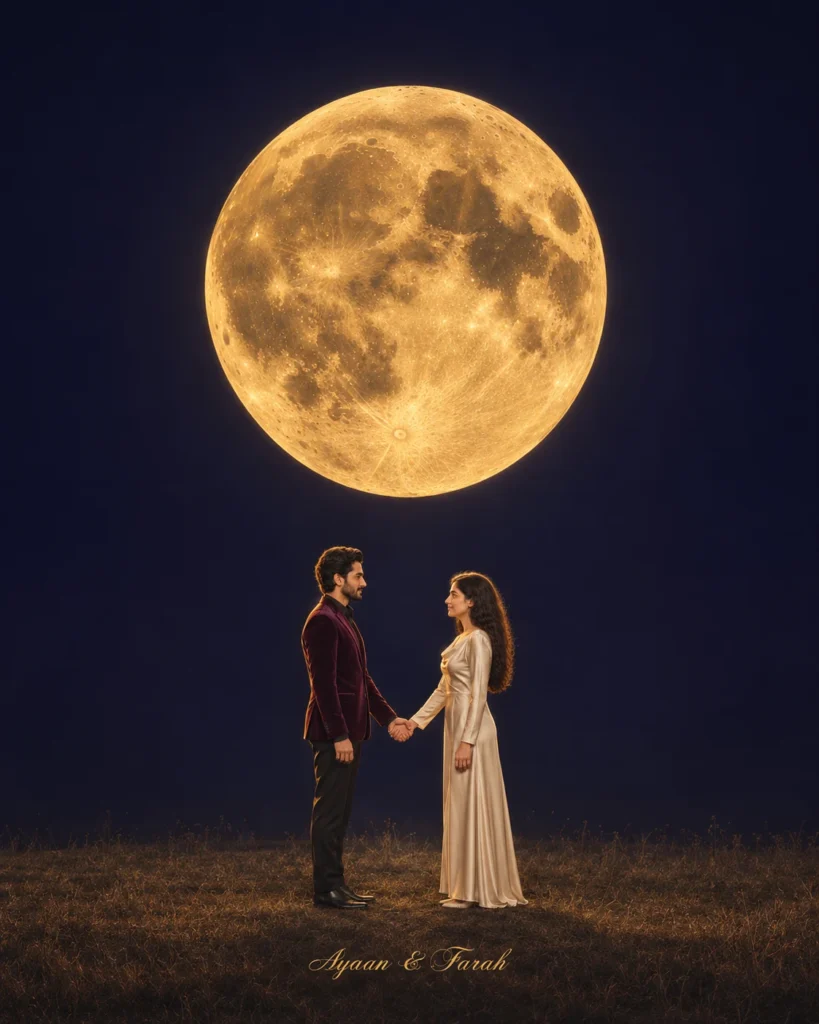
In a midnight-indigo print field under a huge cratered gold full moon, place the couple in a small full-length portrait beneath the moon, standing face to face with hands joined and their profiles visible. Write '[FIRST NAME] & [SECOND NAME]' in fine gold script centred below their feet like a signed print.

Styling: a plum velvet jacket for him and an ivory satin dress for her.

Warm front-side fill from the right keeps both profiles visible, with a narrow golden rim from behind and a rich matte night sky. Keep natural skin texture and fine detail in both faces. 4:5 frame. No watermark.
Collections and similar looks
Share
Help for this look
How to make it, tips, answers and quick fixes. Tap a row to open it.
What this prompt creates
A huge gold full moon with visible craters hangs in an indigo sky above the two of you. Below it, you face each other with hands joined, one in a plum velvet jacket and the other in an ivory satin dress. Warm light reaches the side of each face, and a thin rim of gold picks out your outlines. Both names sit below your feet in fine gold script.
Make it yours
- Use a dark teal sky in place of indigo.
- Put your nicknames in the script line.
- Try a wine-coloured jacket with the ivory dress.
Want to know more? Read about the full moon on Wikipedia.
How to make this gold moon name poster couple photo
- Pick a clear photo of you both
Face towards the camera in good light. Any outfit is fine; the prompt changes it.
- Copy the prompt
Replace both name placeholders with your first names.
- Paste with your photo
For ChatGPT & Gemini, open either app and upload your photo. Paste the prompt and send it.
- Fine-tune it
Ask for the gold script to sit lower if it touches your feet.
Tips for this look
- Use clear side or three-quarter views if available.
- Choose photos with faces in even light.
- Check both spellings before you send the prompt.
- Choose a clear profile or three-quarter view for each face.
- Use a waist-up or full-length photo if you have one.
- Pick photos with the sides of both faces well lit.
Quick answers
Can we use nicknames?
Yes. Put each nickname in place of a name placeholder.
How do we keep our faces visible?
Keep the warm light on your profiles in the prompt.
Common problems and quick fixes
👥 Our faces got mixed
Keep the first lines of the prompt: they tell the tool to keep you two separate. Two separate clear photos also help.
🔤 The words are spelt wrong
Reply “fix the spelling, it should read: …” with the exact words. Short names come out cleanest.
✋ Hands or fingers look odd
Reply “fix the hands and fingers, keep everything else the same”.
🌙 My face looks too dark
Reply “add soft warm light on my face, keep the background the same”.
More couple looks
Similar looks, picked by style and occasion.