Coming up: Christmas
 Find my look in 3 taps














































 💑 Couple
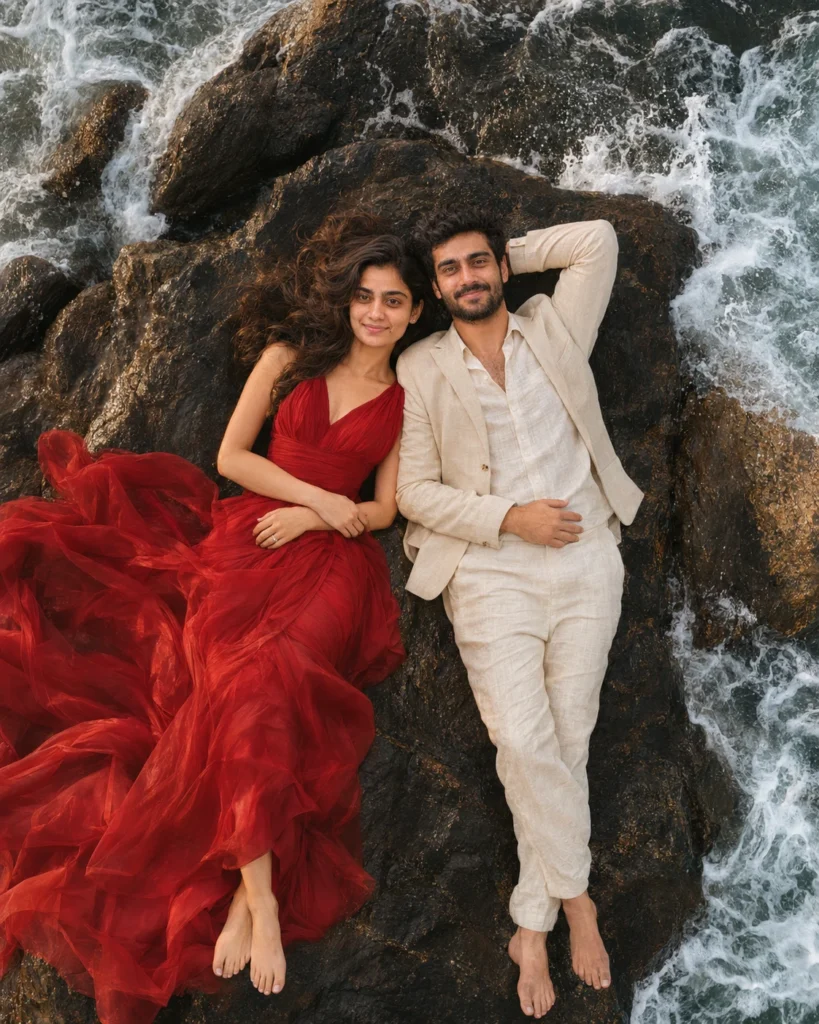
Pre-Wedding Beach Rocks Aerial Couple AI Photo Prompt
Copy this couple AI photo prompt below and paste it into ChatGPT or Gemini with a photo of you both.
Your prompt
Edit the uploaded couple photo. Treat the two people as separate identity references. Keep each face, skin tone, age, hairstyle and set of features exactly as they are, and never blend, swap or replace either person.

Camera: a top-down drone view looking straight down at the couple.

Scene: they lie side by side on dark wet sea rocks with white waves crashing around them, heads close together, looking up at the camera with soft smiles. White foam swirls through the gaps between the rocks.

Styling: the woman wears a long flowing scarlet gown that spreads out across the rock like a ribbon of colour. The man wears a cream linen suit with an open collar.

Light and finish: soft golden-hour light, rich contrast between the red, cream, dark rock and white surf. Both faces sharp and clearly visible. Real drone-photography look, natural skin texture. 4:5 frame. No extra people, no text, no watermark.
Collections and similar looks
Share
Help for this look
How to make it, tips, answers and quick fixes. Tap a row to open it.
What this prompt creates
Seen straight down from a drone, you both lie side by side on dark wet sea rocks, heads close together, looking up at the camera with soft smiles. White waves crash around you and foam swirls through the gaps in the rocks. Her long scarlet gown spreads across the rock like a ribbon of colour, and he wears a cream linen suit with an open collar, all in soft golden-hour light.
Make it yours
- Change the scarlet gown to emerald green or royal blue.
- Swap the rocks for a white sand beach with the gown trailing into the water.
- Dress him in a black suit for a stronger contrast with the foam.
Want to know more? Read about aerial photography on Wikipedia.
How to make this drone pre-wedding photo
- Pick one photo of you both
Faces clear and towards the camera. That helps the top-down view keep your faces right.
- Copy the prompt
Tap Copy prompt. Change the gown colour or the place in the prompt.
- Paste with your photo
Upload in ChatGPT or Gemini, paste and send.
- Check the faces
Top-down shots are tricky. If a face looks off, reply “keep both faces exactly as in my photo, clearly visible”.
Tips for this look
- Bold colours like red, emerald or royal blue stand out best against dark rock.
- Want it calmer? Reply “gentle waves, softer light”.
- Great as the hero photo for a wedding invite or save-the-date.
- Upload a photo where both of you face the camera straight on, so the faces stay clear from above.
- Choose a picture with both faces evenly lit and similar in size.
- A close couple photo works best; the pose keeps your heads near each other.
Real shoot inspiration
Planning a real pre-wedding shoot? Use this as a mood reference to show your photographer the pose and colours you like.
- Upload a photo where both of you face the camera straight on, so the faces stay clear from above.
- Choose a picture with both faces evenly lit and similar in size.
- A close couple photo works best; the pose keeps your heads near each other.
Common problems and quick fixes
👥 Our faces got mixed
Keep the first lines of the prompt: they tell the tool to keep you two separate. Two separate clear photos also help.
🔤 The words are spelt wrong
Reply “fix the spelling, it should read: …” with the exact words. Short names come out cleanest.
🌙 My face looks too dark
Reply “add soft warm light on my face, keep the background the same”.
🟠 Everything looks too yellow or orange
Reply “keep the colours natural and my skin tone true, less orange cast”.
More couple looks
Similar looks, picked by style and occasion.