Coming up: Christmas
 Find my look in 3 taps














































 💑 Couple
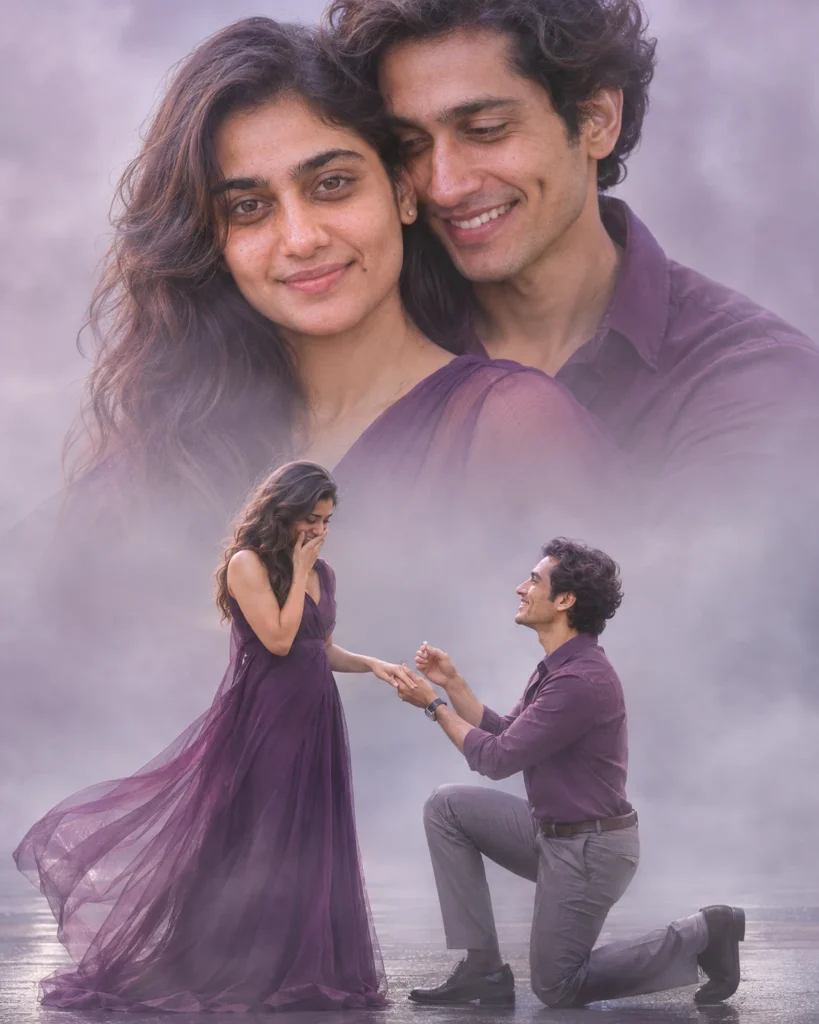
Romantic Proposal Double Exposure Couple AI Photo Prompt
Copy this couple AI photo prompt below and paste it into ChatGPT or Gemini with a photo of you both.
Your prompt
Edit the uploaded photo of two people. Use each person as their own identity reference and keep both faces exactly as they are: face shape, eyes, nose, lips, skin tone, age and hair. Keep the two people clearly separate; do not blend their features.

Create one artistic double-exposure image. Lower half: full-length on a misty pale-grey stage, one partner kneels on one knee holding the other's hand and offering a ring; the other looks down with surprised joy. Upper half: a large, soft, faded close-up of the same two people cheek to cheek, blending smoothly into the mist above.

Styling: a plum shirt and grey trousers for him, a flowing deep-purple chiffon gown for her.

Dreamy lilac and grey tones, soft light. Natural skin texture, true-to-life colours, crisp detail. 4:5 frame. No watermark.
Collections and similar looks
Share
Made with this prompt
More versions of this look
Same prompt, one quick change each. Tap a photo to see it above, or tap Copy prompt to copy that version.
Help for this look
How to make it, tips, answers and quick fixes. Tap a row to open it.
What this prompt creates
This creates one artistic double-exposure picture of you both. In the lower half, on a misty pale-grey stage, one of you kneels on one knee, holding the other's hand and offering a ring, while the other looks down with surprised joy. In the upper half, a large, soft, faded close-up of you both cheek to cheek melts into the mist. He wears a plum shirt and grey trousers; she wears a flowing deep-purple chiffon gown.
Make it yours
- Add "small elegant text: Will you marry me?" at the bottom.
- Write who kneels; it can be either of you.
- Change the purple gown to a blush-pink lehenga and the shirt to ivory.
Want to know more? Read about multiple exposure photography on Wikipedia.
How to make this proposal double exposure
- Pick a clear photo of you both
Face towards the camera in good light. Any outfit is fine; the prompt changes it.
- Copy the prompt
Tap Copy prompt. Change the gown colour in the prompt.
- Paste with your photo
Open ChatGPT or Gemini, upload your photo, paste and send.
- Fine-tune it
Reply “make the top portrait softer” to fade it more.
Tips for this look
- Perfect for Propose Day or an engagement post.
- Two separate photos also work.
- Add your names in small text if you like.
- Two separate clear photos also work for this look.
- For the cheek-to-cheek close-up, pick photos where your faces are well lit and front-facing.
- Full-length photos help the kneeling pose come out right.
Quick answers
Who kneels?
Write who kneels in the prompt; it can be either of you.
Can I add text?
Yes. Add “small elegant text: Will you marry me?” at the end.
Common problems and quick fixes
👥 Our faces got mixed
Keep the first lines of the prompt: they tell the tool to keep you two separate. Two separate clear photos also help.
🔤 The words are spelt wrong
Reply “fix the spelling, it should read: …” with the exact words. Short names come out cleanest.
✋ Hands or fingers look odd
Reply “fix the hands and fingers, keep everything else the same”.
👗 The outfit colour isn’t right
Use the outfit quick change, or reply “make the outfit exactly [colour]”.
More couple looks
Similar looks, picked by style and occasion.