Coming up: Christmas
 Find my look in 3 taps








































 Girls
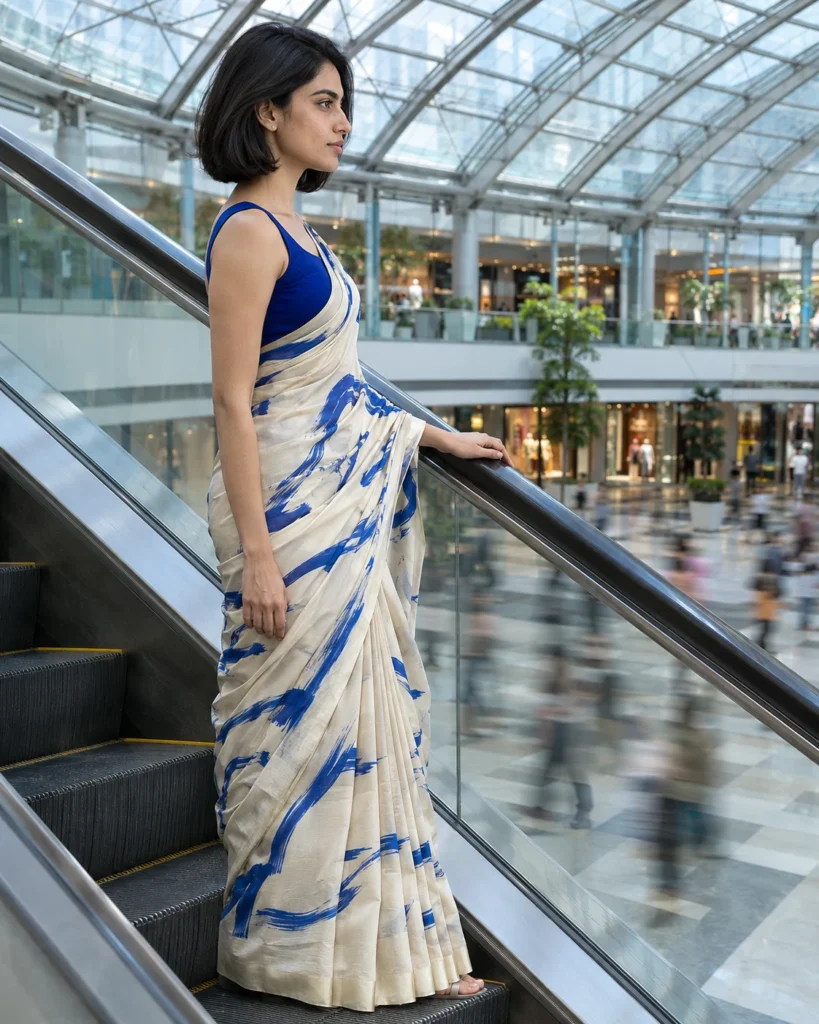
Printed Saree Escalator Motion AI Photo Prompt for Girls
Copy this AI photo prompt for girls below and paste it into ChatGPT or Gemini with your own photo.
Your prompt
Edit the uploaded photo. Use the person in it as the identity reference. Keep their face shape, eyes, nose, lips, skin tone, age and hair exactly as they are. No face reshaping, no plastic-smooth skin.

From the upper landing at a descending escalator at the edge of a glass-roofed mall atrium, photograph the person in a full-length side view as she rides down and looks out across the atrium. Keep her face and pleats sharp while the shoppers moving across the lower floor blur into horizontal streaks.

Styling: an ivory cotton sateen saree with cobalt brushstroke prints, a sleeveless cobalt blouse and small silver studs.

Cool daylight from the glass roof, crisp blue print and soft motion across the lower floor. Real photo look, natural skin texture, true-to-life colours, crisp detail. 4:5 frame. No watermark.
Collections and similar looks
Share
Help for this look
How to make it, tips, answers and quick fixes. Tap a row to open it.
What this prompt creates
From the upper landing, the camera sees you in profile as the mall escalator carries you down. Your saree has blue brushstroke prints over ivory cotton sateen, and you look out across the atrium. Daylight falls through the glass roof and keeps the pleats clearly visible. Down on the lower floor, people pass in soft sideways streaks while your outline stays sharp.
Make it yours
- Change cobalt strokes to rust red.
- Try an olive blouse with simple studs.
- Ask for fewer shoppers on the lower floor.
Want to know more? Read about motion blur on Wikipedia.
How to make this printed saree escalator motion photo
- Pick a clear photo
Face towards the camera in good light. Any outfit is fine; the prompt changes it.
- Copy the prompt
Try rust prints on ivory for a warmer look.
- Paste with your photo
Open ChatGPT & Gemini, upload your photo, paste and send.
- Fine-tune it
Ask for the motion blur to stay on the lower floor.
Tips for this look
- Choose a sharp three-quarter photo.
- Keep both shoulders visible.
- Use 4:5 to include the atrium.
- Choose a clear near-profile photo.
- Leave room around the full drape in your upload.
- Avoid a source photo with blur around your hair.
Quick answers
Can I be looking away?
Yes. The pose is a side view looking across the atrium.
How do I keep the print clear?
Ask for sharp pleats and blur only the people below.
Common problems and quick fixes
😕 My face doesn’t look like me
Use a sharper, front-facing photo in daylight, then reply “keep my face exactly as in my photo, only change the scene”.
💨 My face came out blurred
Reply “keep my face sharp, blur only the background and the moving parts”.
👗 The outfit colour isn’t right
Use the outfit quick change, or reply “make the outfit exactly [colour]”.
🎨 Skin looks too smooth
Reply “keep my natural skin texture, no beauty filter”. Small follow-ups work better than starting over.
More looks for girls
Similar looks, picked by style and occasion.