Coming up: Christmas
 Find my look in 3 taps








































 💑 Couple
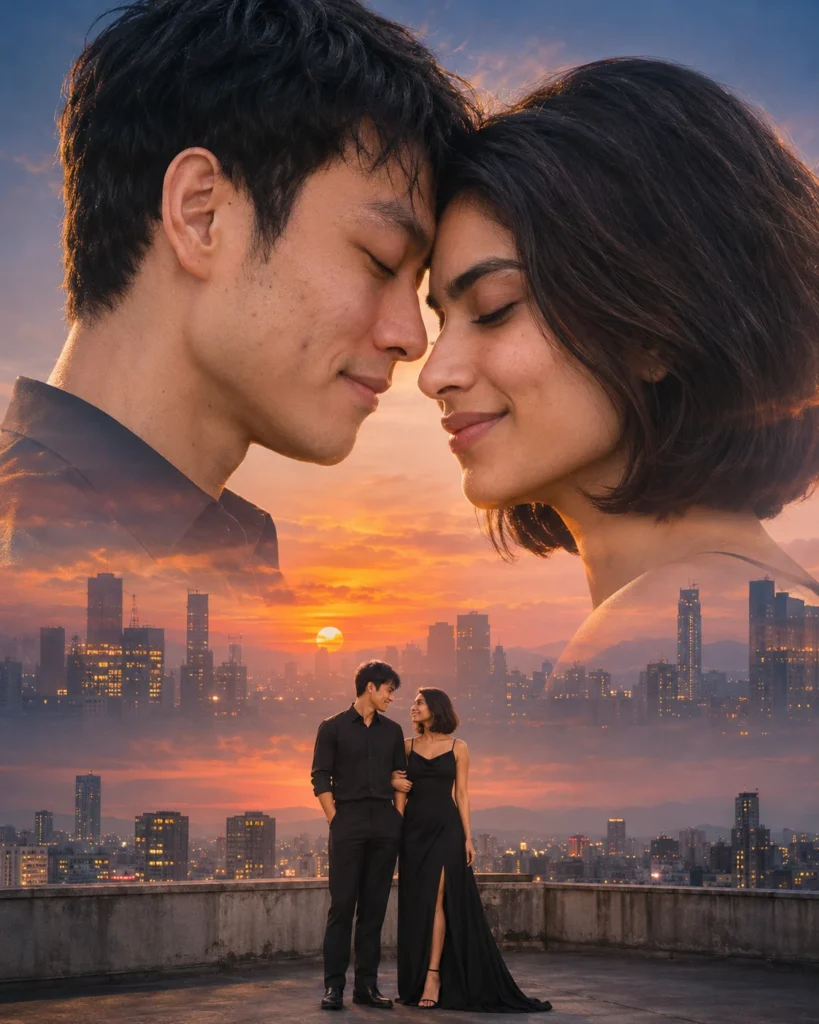
Double Exposure Couple AI Photo Prompt: Sunset
Copy this couple AI photo prompt below and paste it into ChatGPT or Gemini with a photo of you both.
Your prompt
Edit the uploaded photo of two people. Use each person as their own identity reference and keep both faces exactly as they are: face shape, eyes, nose, lips, skin tone, age and hair. Keep the two people clearly separate; do not blend their features.

A double-exposure couple poster: the top half is a big close-up of the couple touching foreheads with eyes closed, softly blended into a city skyline at sunset; at the bottom, a small full-length shot of the same two standing together on a rooftop.

Styling: a black shirt for him, a black evening gown for her.

Warm sunset oranges blending into dusk blue, dreamy film-poster feel. Real photo look, natural skin texture, true-to-life colours, crisp detail. 4:5 frame. No watermark.
Collections and similar looks
Share
Help for this look
How to make it, tips, answers and quick fixes. Tap a row to open it.
What this prompt creates
A double-exposure couple poster: the top half is a big close-up of you both touching foreheads with eyes closed, softly blended into a city skyline at sunset; at the bottom, a small full-length shot of you standing together on a rooftop. He wears a black shirt; she wears a black evening gown.
Make it yours
- Change the skyline to mountains.
- Add your real names at the bottom.
- Make it a beach sunset.
Want to know more? Read about multiple exposure on Wikipedia.
How to make this sunset forehead touch double exposure couple photo
- Pick a clear photo of you both
Face towards the camera in good light. Any outfit is fine; the prompt changes it.
- Copy the prompt
Change the skyline to mountains or the sea.
- Paste with your photo
Open ChatGPT or Gemini, upload your photo, paste and send.
- Fine-tune it
Reply “make the blend softer”.
Tips for this look
- Clear photos of you both work best.
- Separate photos are fine.
- Use 4:5.
- Use clear photos of you both.
- Front-facing photos blend best.
- Use 4:5 or 9:16.
Quick answers
Can we add our names?
Yes. Add your real names in small letters at the bottom.
Which ratio?
4:5 or 9:16.
Common problems and quick fixes
👥 Our faces got mixed
Keep the first lines of the prompt: they tell the tool to keep you two separate. Two separate clear photos also help.
🔤 The words are spelt wrong
Reply “fix the spelling, it should read: …” with the exact words. Short names come out cleanest.
🌙 My face looks too dark
Reply “add soft warm light on my face, keep the background the same”.
🟠 Everything looks too yellow or orange
Reply “keep the colours natural and my skin tone true, less orange cast”.
More couple looks
Similar looks, picked by style and occasion.