Coming up: Christmas
 Find my look in 3 taps

















































 Boys
Red Light Painting Effect AI Photo Prompt for Boys
Copy this AI photo prompt for boys below and paste it into ChatGPT or Gemini with your own photo.
Your prompt
Edit the uploaded photo. Use the person in it as the identity reference. Keep their face shape, eyes, nose, lips, skin tone, age and hair exactly as they are. No face reshaping, no plastic-smooth skin.

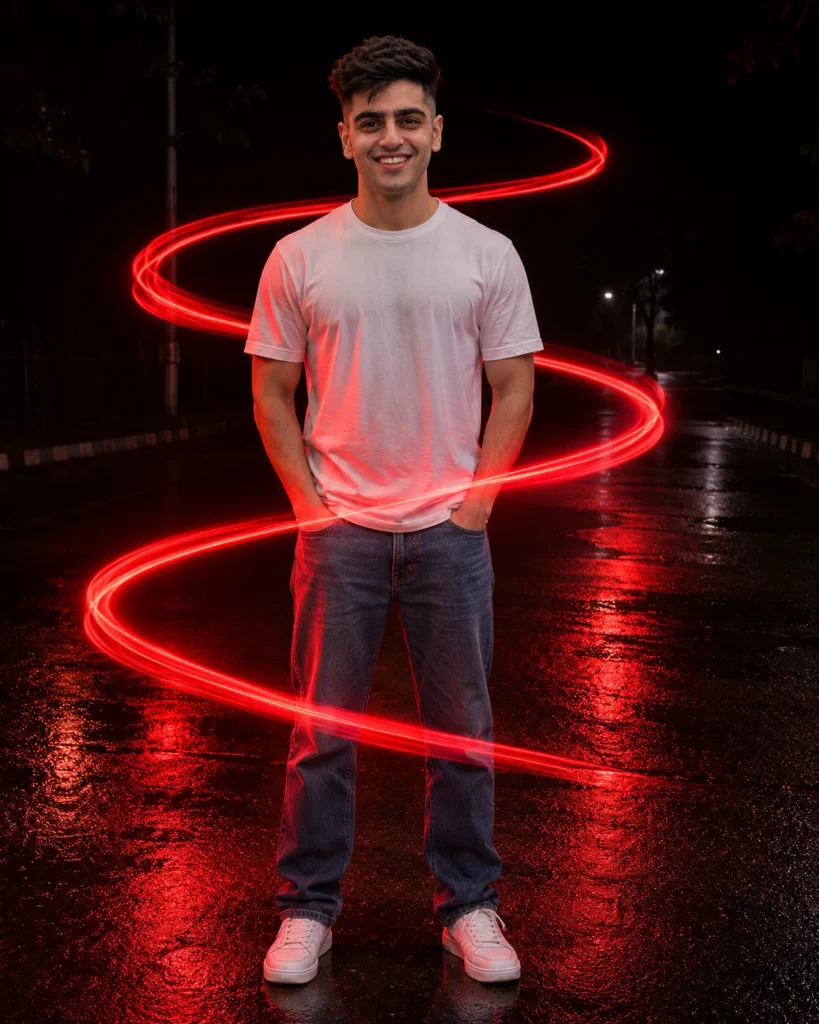
On an unlit night street with dark wet asphalt, show the person standing still in a full-length frame while one thick red light trail winds around him in open spirals. Let the red glow reach his shirt and pool on the road, with his face clear between the loops.

Styling: a plain white shirt and blue jeans.

Long-exposure effect with deep blacks, a sharp subject and red reflected light. Natural skin texture and crisp photographic detail. 4:5 frame. No watermark.
Collections and similar looks
Share
Help for this look
How to make it, tips, answers and quick fixes. Tap a row to open it.
What this prompt creates
One red ribbon of light circles you on a dark street, looping up from the wet road through the space around your body. Your white shirt picks up a red glow, and the jeans are visible in the full-length frame. You stand still while the spiral appears to move around you, with your face sharp and visible between its widest loops.
Make it yours
- Try electric blue trails
- Keep the highest loop at waist level
- Make the street reflection longer
Want to know more? Read about light painting on Wikipedia.
How to make this red light painting effect photo
- Pick a clear photo
Face towards the camera in good light. Any outfit is fine; the prompt changes it.
- Copy the prompt
Change the trail to electric blue.
- Paste with your photo
Open ChatGPT or Gemini, upload your photo, paste and send.
- Fine-tune it
Ask for the highest loop to stay below your eyes.
Tips for this look
- Use a photo that shows your usual build.
- Choose a clear face photo without a filter.
- Leave room around the body in the frame.
- Use a standing reference if possible
- Choose a face photo without coloured light
- Keep your hair edges and eyes clear
Quick answers
Do I need a night photo?
A clear daylight photo can serve as the face reference.
Can the trail be thinner?
Yes, ask for a narrow line with a softer glow.
Common problems and quick fixes
😕 My face doesn’t look like me
Use a sharper, front-facing photo in daylight, then reply “keep my face exactly as in my photo, only change the scene”.
🌙 My face looks too dark
Reply “add soft warm light on my face, keep the background the same”.
👗 The outfit colour isn’t right
Use the outfit quick change, or reply “make the outfit exactly [colour]”.
🎨 Skin looks too smooth
Reply “keep my natural skin texture, no beauty filter”. Small follow-ups work better than starting over.
More looks for boys
Similar looks, picked by style and occasion.