Coming up: Christmas
 Find my look in 3 taps
















































 Girls
Sunflower Saree Name Typography Poster AI Photo Prompt for Girls
Copy this AI photo prompt for girls below and paste it into ChatGPT or Gemini with your own photo.
Your prompt
Edit the uploaded photo. Use the person in it as the identity reference. Keep their face shape, eyes, nose, lips, skin tone, age and hair exactly as they are. No face reshaping, no plastic-smooth skin.

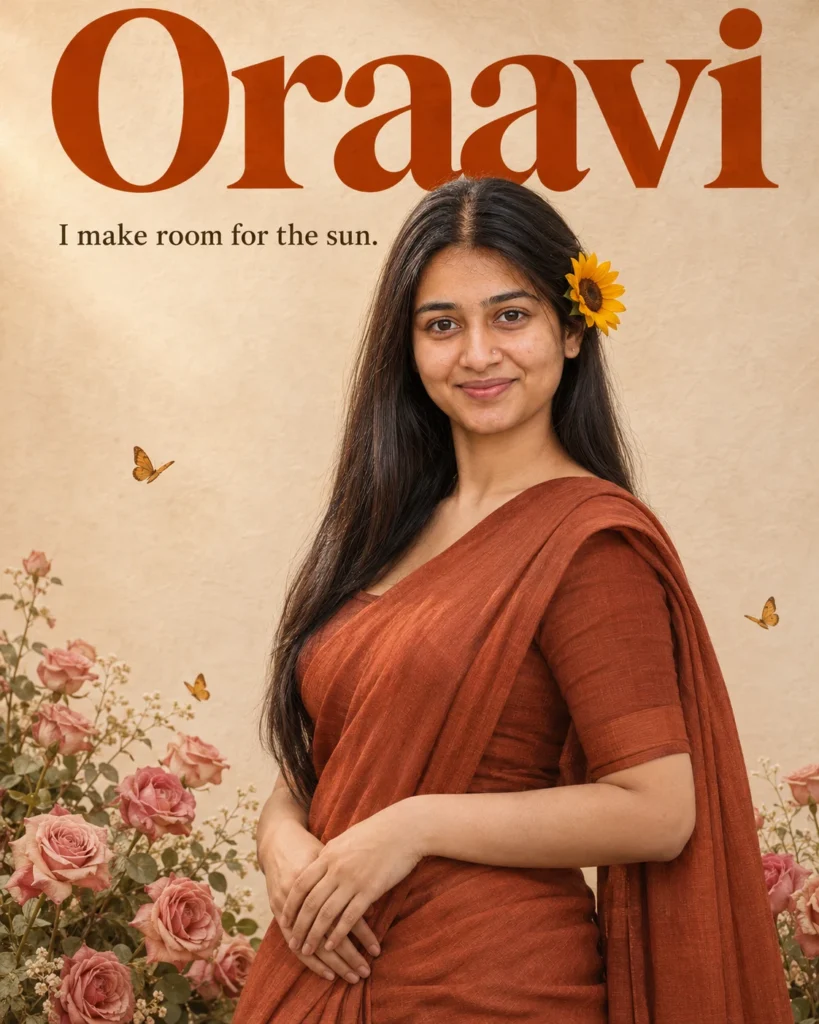
On a warm cream paper backdrop with a low arrangement of dusty pink roses and a few small ochre butterflies, show the person standing slightly right of centre in three-quarter view, lit from upper left, with the giant bold burnt-orange serif name "Oraavi" set behind her and its letters still easy to read. Set the exact line "I make room for the sun." below the name in small dark type, clear of the figure and the roses.

Styling: a rust saree with a matte finish and one sunflower tucked into her hair.

Soft studio light, warm cream and burnt orange, crisp typesetting and a gently textured paper finish. Real photo look with natural skin texture and fine detail. 4:5 frame. No watermark, flags, religious or devotional elements, Diwali references or celebrity likenesses.
Collections and similar looks
Share
Help for this look
How to make it, tips, answers and quick fixes. Tap a row to open it.
What this prompt creates
Your name stretches across warm cream paper in bold burnt-orange letters. You stand just off centre in a rust saree with a single sunflower in your hair, lit softly from the upper left. Dusty pink roses sit low in the frame, and a few small ochre butterflies leave plenty of breathing room. A short dark line below the name reads, "I make room for the sun."
Make it yours
- Choose the exact spelling and capital letters for your name.
- Try ivory roses along the bottom.
- Write a short line of your own to sit beneath the name.
Want to know more? Read about typography on Wikipedia.
How to make this sunflower saree name typography poster photo
- Pick a clear photo
Face towards the camera in good light. Any outfit is fine; the prompt changes it.
- Copy the prompt
Replace the sample name with the name you want printed.
- Paste with your photo
Use this prompt with ChatGPT & Gemini. In your chosen app, upload your photo, paste the prompt and send.
- Fine-tune it
Ask for more space before and after a long name.
Tips for this look
- Use a standing photo in soft light.
- Pick a photo with your hairline visible.
- Check the name spelling before pasting.
- Pick a standing portrait with room above your hair.
- Choose soft light for a clear outline around your saree.
- Keep your shoulders gently turned if you have a choice of shots.
Quick answers
Can I use a longer name?
Yes. Ask for a slightly smaller type size so it stays on one line.
Can I change the small line?
Yes. Put your exact words inside the quotation marks.
Common problems and quick fixes
😕 My face doesn’t look like me
Use a sharper, front-facing photo in daylight, then reply “keep my face exactly as in my photo, only change the scene”.
🔤 The words are spelt wrong
Reply “fix the spelling, it should read: …” with the exact words. Short names come out cleanest.
🌙 My face looks too dark
Reply “add soft warm light on my face, keep the background the same”.
👗 The outfit colour isn’t right
Use the outfit quick change, or reply “make the outfit exactly [colour]”.
More looks for girls
Similar looks, picked by style and occasion.