Coming up: Christmas
 Find my look in 3 taps















































 Boys
Chibi Flashlight AI Photo Prompt for Boys
Copy this AI photo prompt for boys below and paste it into ChatGPT or Gemini with your own photo.
Your prompt
Edit the uploaded photo. Use the person in it as the identity reference. Keep their face shape, eyes, nose, lips, skin tone, age and hair exactly as they are. No face reshaping, no plastic-smooth skin.

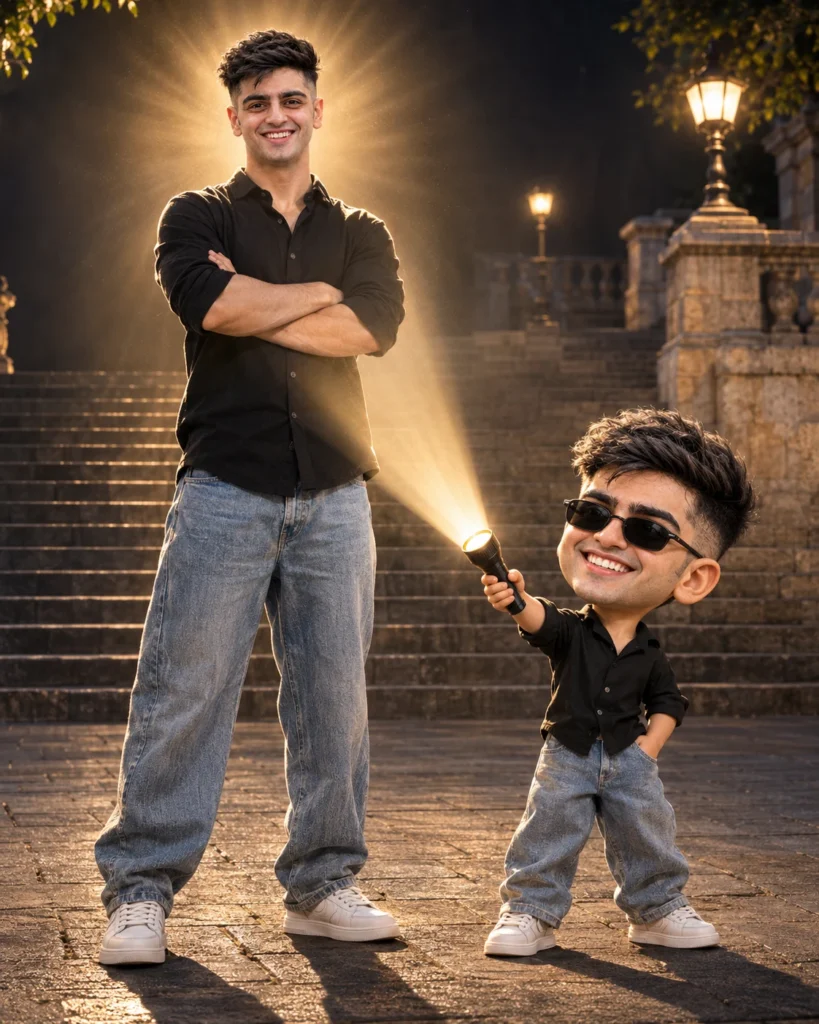
Scene: a stone plaza with steps at night. The person stands confidently, arms crossed. The light comes from a cute big-headed 3D chibi cartoon version of the same person (same hairstyle, same outfit) standing beside them and pointing a torch at them, throwing a bright cone of light and a glowing halo behind the real person. Real person photorealistic; the chibi in polished 3D animation style.

Styling: a black shirt, loose light-blue jeans and white sneakers, the chibi in the same outfit with tiny sunglasses.

Cinematic night light. Natural skin texture, true-to-life colours, crisp detail. 4:5 frame. No watermark.
Collections and similar looks
Share
Made with this prompt
More versions of this look
Same prompt, one quick change each. Tap a photo to see it above, or tap Copy prompt to copy that version.
Help for this look
How to make it, tips, answers and quick fixes. Tap a row to open it.
What this prompt creates
Picture yourself on a stone plaza with steps at night, standing tall with arms crossed. A small big-headed 3D chibi of you, dressed in the same black shirt, loose light-blue jeans and white sneakers, plus tiny sunglasses, stands beside you and aims a torch your way. The beam throws a bright cone of light on you and a glowing halo behind, like your own mini crew lighting the scene.
Make it yours
- Move it to a garden or a basketball court for a softer or sportier look.
- Change the outfit to a white kurta and jeans for festival season.
- Give the chibi a cap or headphones as well as the sunglasses.
Want to know more? Read about super-deformed cartoon characters on Wikipedia.
How to make this chibi flashlight photo
- Pick a clear photo
Face towards the camera in good light. Any outfit is fine; the prompt changes it.
- Copy the prompt
Tap Copy prompt. Change your outfit; the chibi copies it in the prompt if you like.
- Paste with your photo
Open ChatGPT or Gemini, upload your photo, paste and send.
- Fine-tune it
Reply “make the chibi smaller” or “stronger torch light”.
Tips for this look
- A full-length photo works best.
- Great for reels: post it with a torch sound.
- Try a garden setting for a softer look.
- A full-body photo works best so the twin can copy your shoes and jeans.
- Stand straight in your photo; a slouched pose makes the crossed-arms look weaker.
- Clear hair in the photo helps the chibi get your hairstyle right.
Quick answers
Will the cartoon look like me?
Yes. It copies your hairstyle and outfit in cartoon style.
Is the real me cartoon too?
No. You stay real; only the little twin is 3D.
Common problems and quick fixes
😕 My face doesn’t look like me
Use a sharper, front-facing photo in daylight, then reply “keep my face exactly as in my photo, only change the scene”.
🧸 The cartoon doesn’t look like me
Reply “keep my hairstyle, face shape and skin tone in the cartoon”. A smiling, front-facing photo helps most.
🌙 My face looks too dark
Reply “add soft warm light on my face, keep the background the same”.
👗 The outfit colour isn’t right
Use the outfit quick change, or reply “make the outfit exactly [colour]”.
More looks for boys
Similar looks, picked by style and occasion.