Coming up: Christmas
 Find my look in 3 taps

















































 Boys
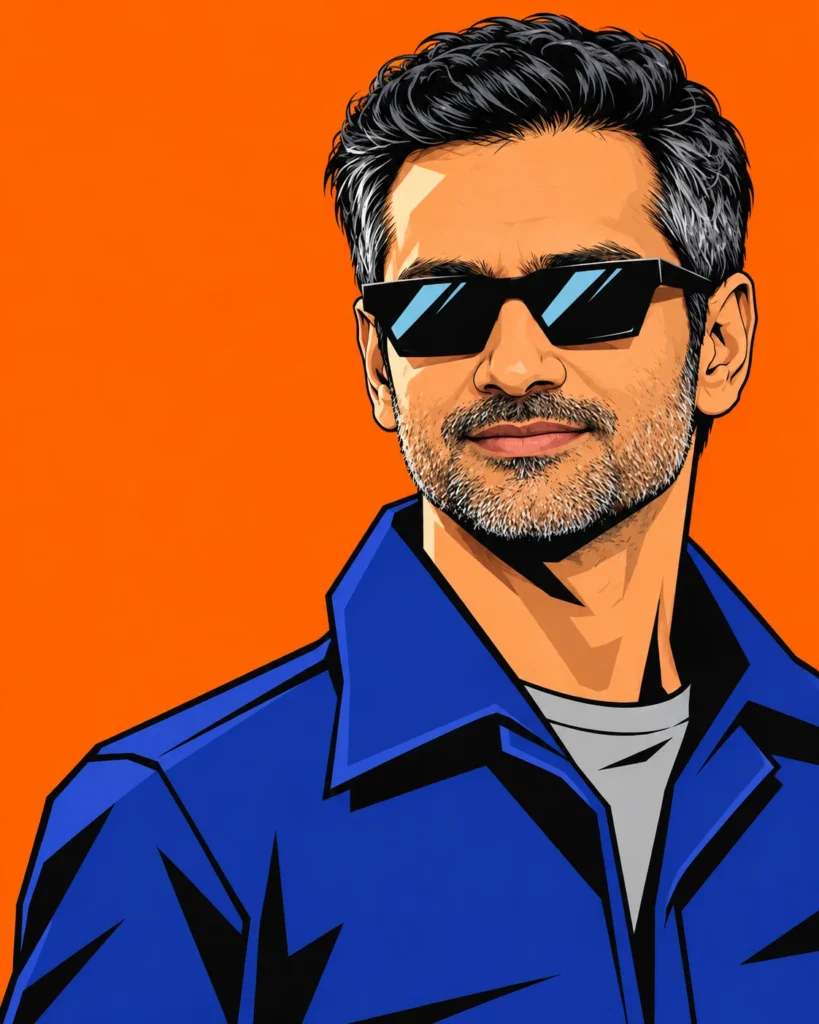
Orange Vector Pop Art Portrait AI Photo Prompt for Boys
Copy this AI photo prompt for boys below and paste it into ChatGPT or Gemini with your own photo.
Your prompt
Edit the uploaded photo. Use the person in it as the identity reference. Keep their face shape, eyes, nose, lips, skin tone, age and hair exactly as they are. No face reshaping, no plastic-smooth skin.

On an uninterrupted bright orange background, draw the person from mid-chest up in a three-quarter turn, placed slightly to the right with open orange space at the left. Trace the hair and jaw with bold black contours and build the cheek, neck and jacket folds from straight-edged colour shapes, like light hitting from the upper left.

Styling: a boxy cobalt jacket with a wide collar and angular black sunglasses with pale blue reflections.

A flat, hard-edged vector illustration with solid colour fills and deep ink shadows. 4:5 frame. No watermark.
Collections and similar looks
Share
Help for this look
How to make it, tips, answers and quick fixes. Tap a row to open it.
What this prompt creates
Against a solid bright orange field, your illustrated portrait sits slightly right of centre. You turn three-quarters towards the viewer in black angular sunglasses and a cobalt jacket with a wide collar. Pale blue shapes mark the reflections in the lenses. Thick black lines trace your jaw and hair, and straight-edged pieces of colour shape your cheek, neck and jacket folds.
Make it yours
- Switch the cobalt jacket to emerald.
- Try dark violet lens reflections.
- Ask for a smaller collar with the same sharp corners.
Want to know more? Read about vector graphics on Wikipedia.
How to make this orange vector pop art portrait
- Pick a clear photo
Face towards the camera in good light. Any outfit is fine; the prompt changes it.
- Copy the prompt
Swap the cobalt jacket for a sharp emerald green.
- Paste with your photo
Open ChatGPT & Gemini, upload your photo, paste and send.
- Fine-tune it
Ask for solid fills and clean angular shadows.
Tips for this look
- Try a clear three-quarter reference photo.
- Keep your hairline and jaw visible.
- Use a plain source background for a clear outline.
- Use a clear three-quarter photo.
- Choose a source with your hairline visible.
- Keep your neck and shoulders in the crop.
Quick answers
Can I use a photo without sunglasses?
Yes. The style adds the black frames and pale blue reflections.
How do I keep it flat like vector art?
Ask for solid blocks of colour with crisp edges across the face and jacket.
Common problems and quick fixes
😕 My face doesn’t look like me
Use a sharper, front-facing photo in daylight, then reply “keep my face exactly as in my photo, only change the scene”.
👗 The outfit colour isn’t right
Use the outfit quick change, or reply “make the outfit exactly [colour]”.
🎨 Skin looks too smooth
Reply “keep my natural skin texture, no beauty filter”. Small follow-ups work better than starting over.
🔁 It isn’t quite the look
Regenerate once, or reply with one change at a time, like “wider shot” or “warmer light”.
More looks for boys
Similar looks, picked by style and occasion.